A guide for you and the people you trust — what it does, how each part works, and why
it is built the way it is.
Relay holds the things your family would need if you could not be reached — the
account that everything else recovers through, the bank, the policy number, the instruction that
only lives in your head — and hands them to specific people, only when specific people agree
something has actually happened.
It is not a password manager, and it is not a will. A password manager assumes you are there to
open it. A will assumes you are not coming back. Relay is for the long middle: the surgery, the
accident, the three weeks in hospital, the trip where nobody could reach you. Everything it does
is reversible by you, right up until you choose something that is not.
The one idea worth understanding
Nothing opens because a computer decided it should. Something opens because people you named
in advance said it was real. Relay's job is to make that agreement possible at three in the
morning, between people who may never have met, without any of them having to trust a stranger's
email.
Three promises the design keeps, everywhere, without exception.
A real message from Relay never asks you to click a link and then sign in or enter
anything. When something needs you, we send a short code and you type it at
relaystandby.com — an address you come to yourself. In the one rare failure case where we
send a personal access link, even that link asks you for nothing after you follow it. So a
message that asks you to click and then log in, or click and then enter a code, is an
imitation — and typing short codes instead of clicking links removes an entire class of
attack on your family.
What is inside your vault never leaves your browser unencrypted. Relay cannot read
your items. Neither can anyone who steals the database.
Everything that happens is written to a record that cannot be edited or deleted —
including by us. That is what makes the summary you read afterwards trustworthy rather than
merely reassuring.
What is in this guide
Part 1
Setting it up — the things you do once
Part 2
Living with it — the part that lasts for years
Part 3
For the people you name — what they see and what is asked of them
Part 4
The day it matters — how a release actually runs
Part 5
When something goes wrong — lost phones, false alarms, leaving
Part 6
What Relay will not do, stated plainly
Part 1
Setting it up
Done once, in this order. Most people finish in under an hour, and the order matters
more than the speed — each step assumes the one before it.
1.0 — Getting in, and the one thing to keep
You · once, at the start
Why there is no password. A password is a thing you can be persuaded to
type into a convincing page. Relay uses an authenticator app instead, so there is nothing an
imitation of us could ask you for that would work.
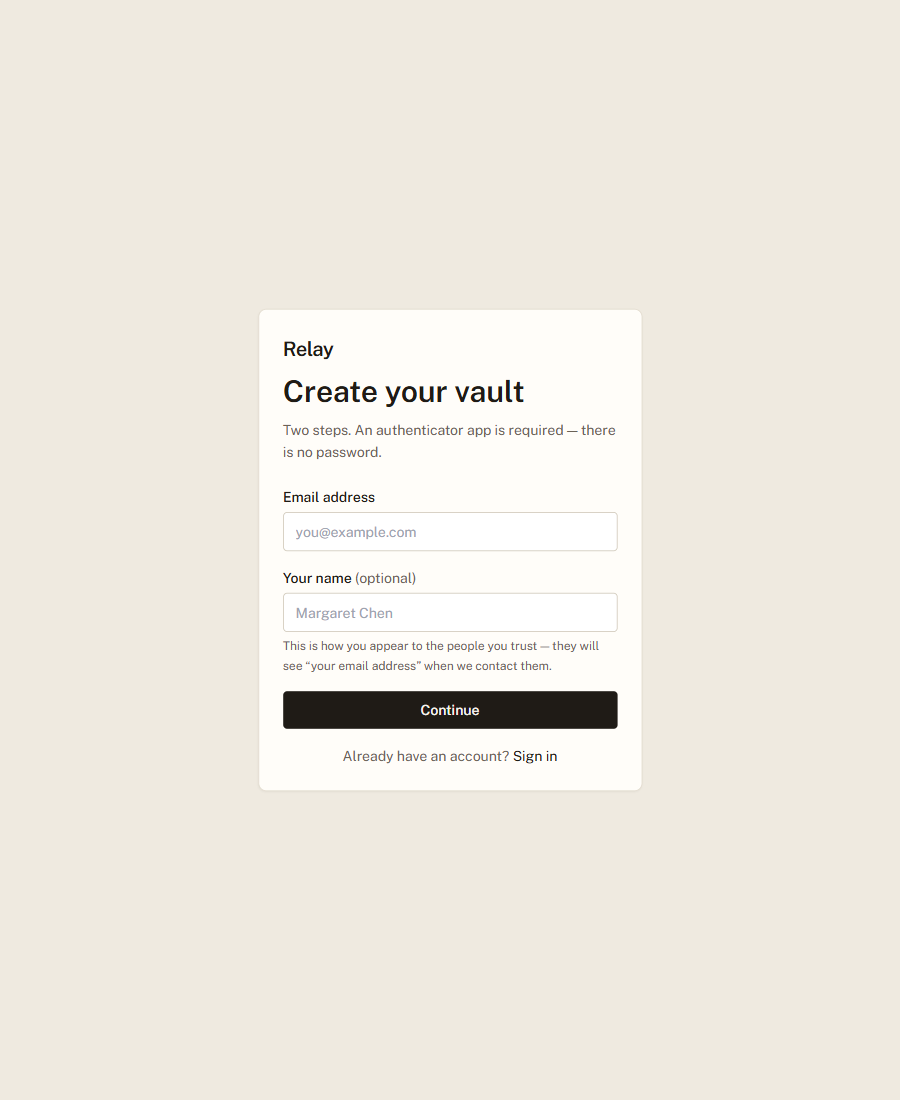
Two steps and no password. Set your name while you are there — it is how you appear
to everybody you name, and the signup page shows you what they would otherwise see.
Keep the recovery codes. They are shown once, they are the only way back if you lose the
phone with your authenticator on it, and nobody — including us — can reissue them for
you afterwards.
Creating a vault. The
name field shows the consequence of leaving it blank, at the one moment it can still be
avoided.
1.1 — Put in what actually matters
You · the Vault screen
Why this exists. The instinct is to put in everything. That is the wrong
instinct, and it is the main reason plans like this fail: a list of ninety accounts is a list nobody
can act on. Your family needs the four or five things that unlock the rest.
How it works. Add an item and Relay encrypts it in your browser before it is sent
anywhere. It then scores each item for consequence and sorts the list with the most consequential
first — the account that other accounts recover through outranks the one with the biggest balance,
because losing the recovery path means losing everything downstream.
Items are ordered by what would be hardest to live without, not by when you added them.
The line under each item tells you why it is ranked where it is.
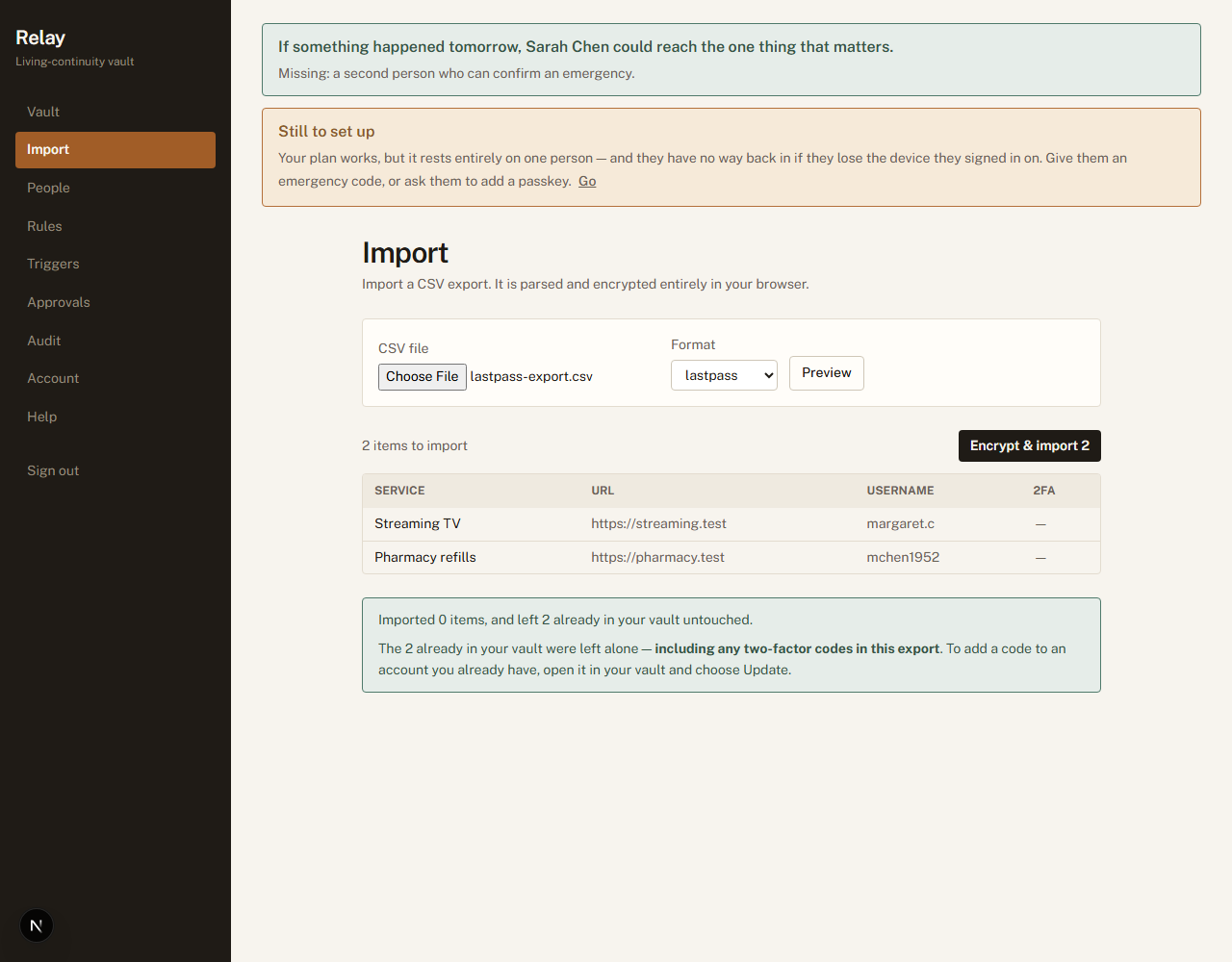
Import CSV takes an export from a password manager, which is how most people should
start — it is parsed and encrypted in your browser, and you see exactly what is about to
be added before anything is written. Rows you already have are skipped rather than duplicated,
and the count of skips is reported: a silent skip would have you believe credentials went
missing. If your export carries two-factor codes, they come along too.
A password is often not enough on its own. If an account asks you for a six-digit code
from your phone, store that too: the entry form has a place for the code setup (the long
“secret key” the account showed you when you turned codes on) and for backup codes.
When the day comes, the person stepping in is shown a working six-digit code — not a
puzzle.
Three things only you can tell it. On any item you can leave a short note in your own
words — “the paper statements are in the fire safe” — which
travels with the item to whoever opens it. You can mark an item Cannot be replaced
— the photo archive, not the streaming login — so the advice under your vault
treats losing it as seriously as you do. And you can answer Needs a code? —
whether that account asks for a six-digit code as well as a password.
Why “Needs a code?” is worth answering. A password for an account
protected by two-factor is a locked door. Until you say which of your accounts ask for a code,
Relay cannot tell whether the people you have named could really get in — so it does not
guess. Answer it on the few accounts that matter and the sentence at the top of your screen starts
telling you the truth: an account that asks for a code, where you have stored only the password,
stops being counted as something your family could reach. Leaving it unanswered changes
nothing.
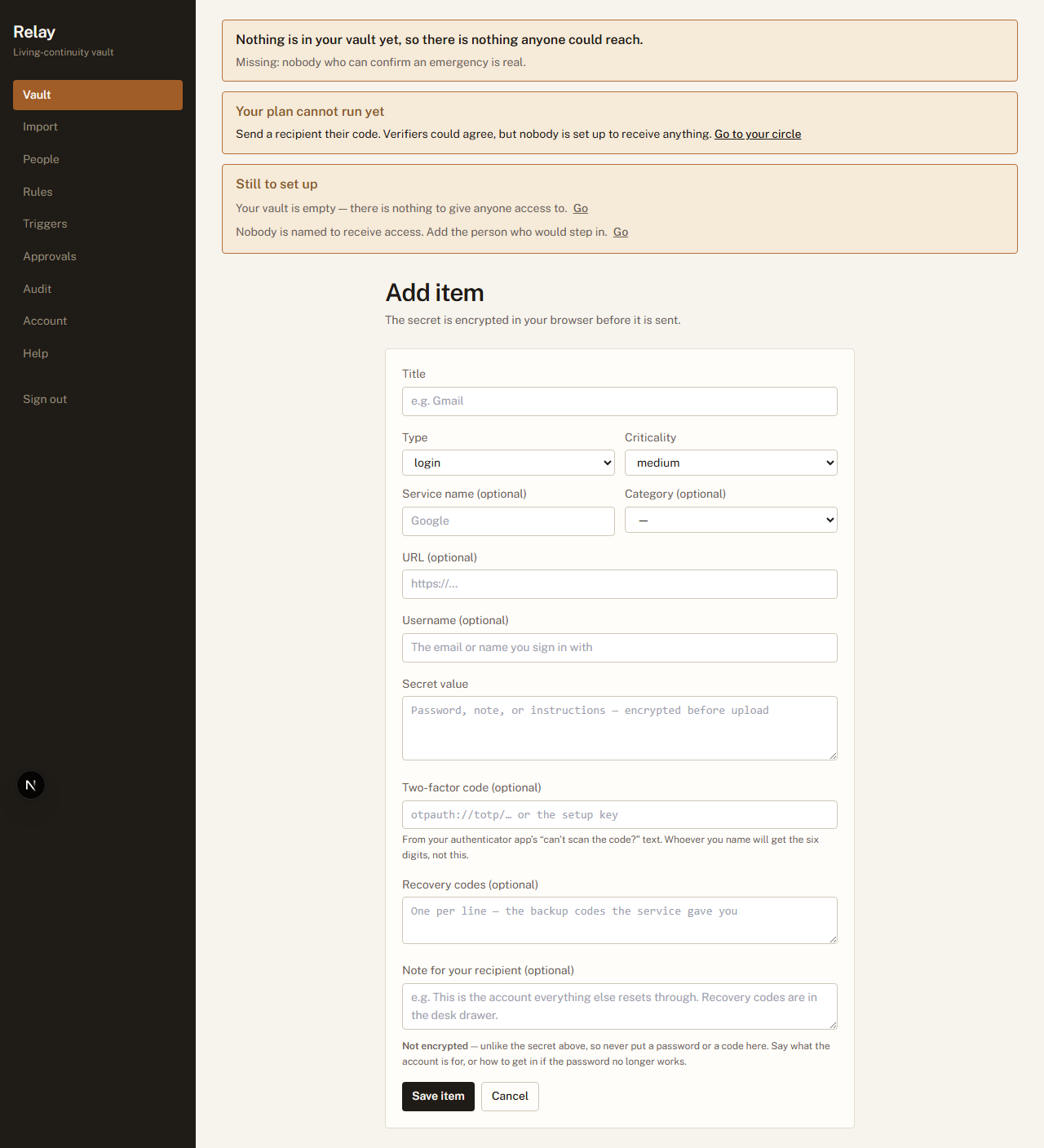
Adding an item:
labelled fields, including the second factor. The secret fields are encrypted in your browser
before they are sent; the note deliberately is not — it has to be readable to be advice — and the
form says so, which is why it also says never to put a password there.
The free plan holds ten items, four people who can receive access, and four
who can confirm an emergency. Those are separate counts, so naming somebody to confirm never
costs you a place for somebody to receive. That is deliberately enough to reach the point of the
product — the four or five things that unlock the rest, and the handful of people who would
step in — rather than a trial that expires. A file larger than the
remaining room is refused whole rather than trimmed to fit, because a vault that quietly stopped
halfway through your export is exactly the false sense of completeness this is meant to prevent.
The preview shows the
service, the address and the username — and no passwords. It is the one screen where
somebody looking over your shoulder would otherwise see the whole file at once.
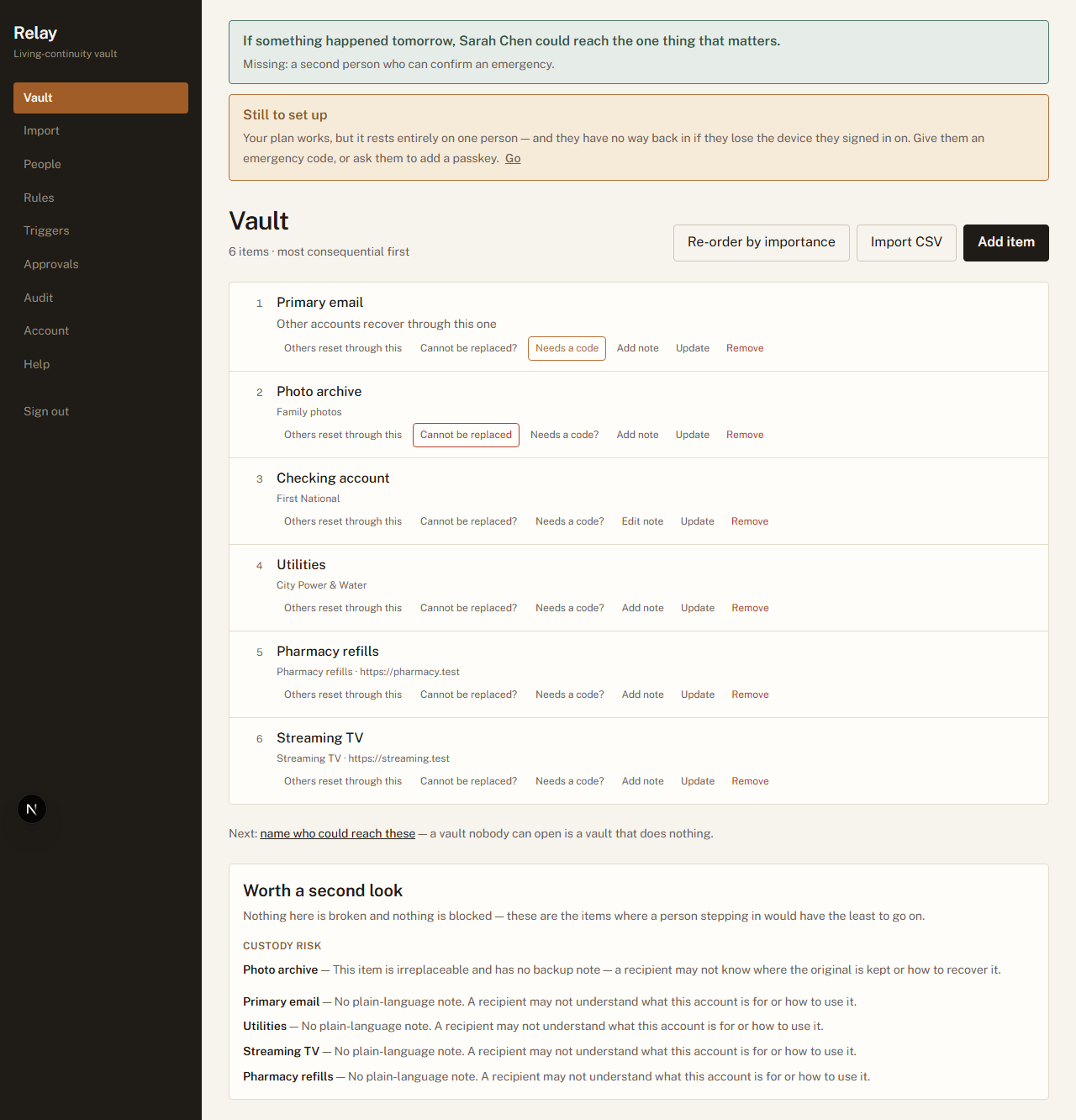
The banner across the top is the single most useful thing on the screen. It answers one question
— if something happened tomorrow, would this work? — and it is honest about the answer.
The vault, most
consequential first. The prompt at the bottom points at the next thing that would actually help —
a vault nobody can open is a vault that does nothing.
1.2 — Name the people
You · the People screen
Why this exists. Two different jobs get confused constantly, and confusing
them is how a plan ends up doing nothing. Some people receive access. Other people are asked
whether the emergency is real. They can be the same person, but the roles are separate, and a
plan needs both.
Role
What they do
What they see
Who would step in (recipients)
Receive access to the items you assign
them, and only after a release opens.
Before a release: that they are standing by, for
whom, and how much is set aside — counts and categories only, never titles.
Who confirms it is real (verifiers)
Answer one question — is this
genuine? — and nothing else. They never receive access.
At the moment they are asked:
how much is at stake and what kind of thing it is. Never a title, never a contents.
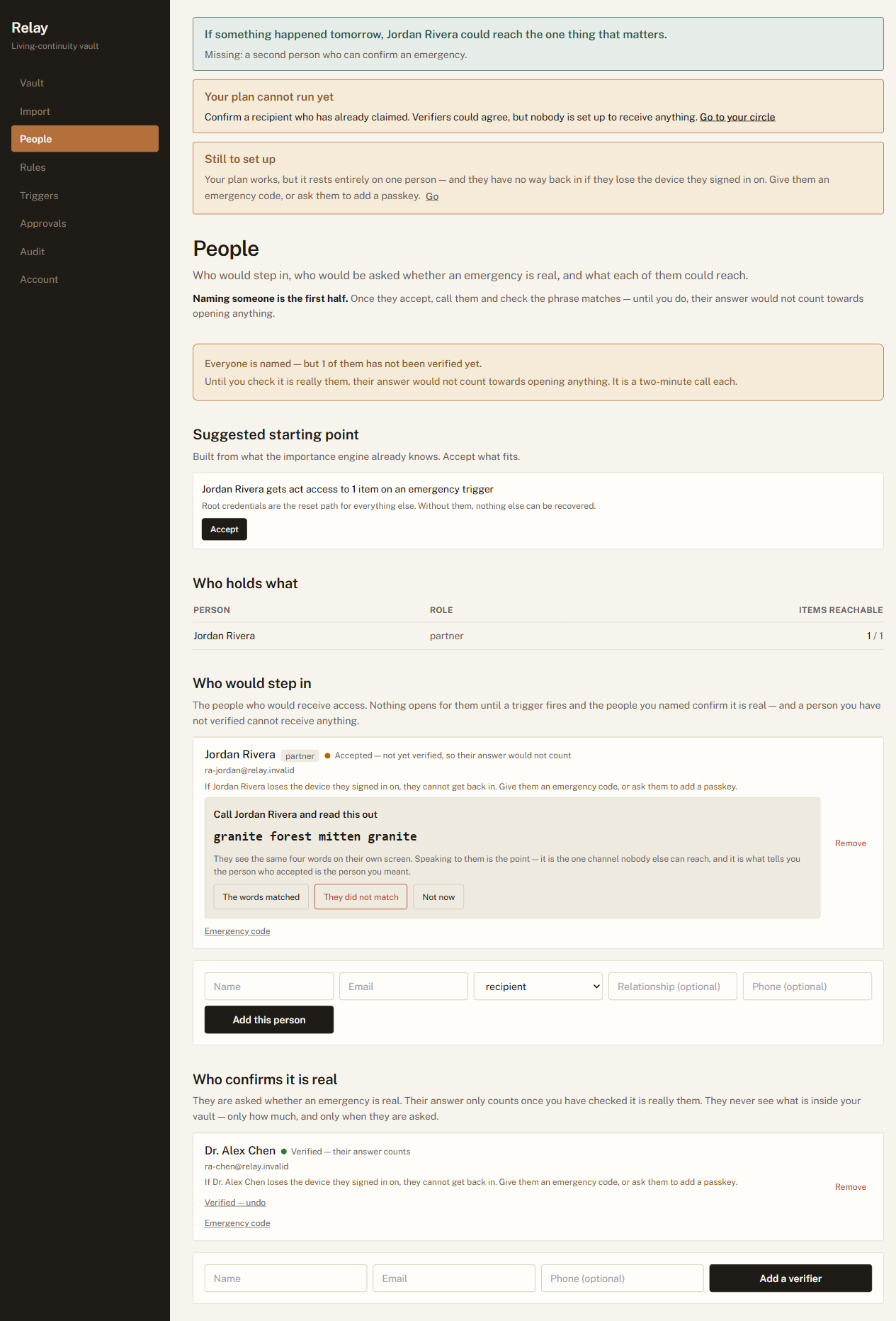
Naming someone is only the first half. Once they accept, Relay derives a short phrase from
their account. You call them — an actual call — and check the phrase they read out matches the one
on your screen. That call is what turns "someone with this email address accepted" into "this is my
sister". Until you make it, their answer does not count towards opening anything.
Why a phone call, in a product that is otherwise entirely software. Every
purely-digital way of proving identity here reduces to trusting an email inbox, and an inbox is the
thing most likely to be compromised in exactly the scenario this product exists for. Two minutes on
the phone is stronger than anything we could build, and it costs you one call per person, once.
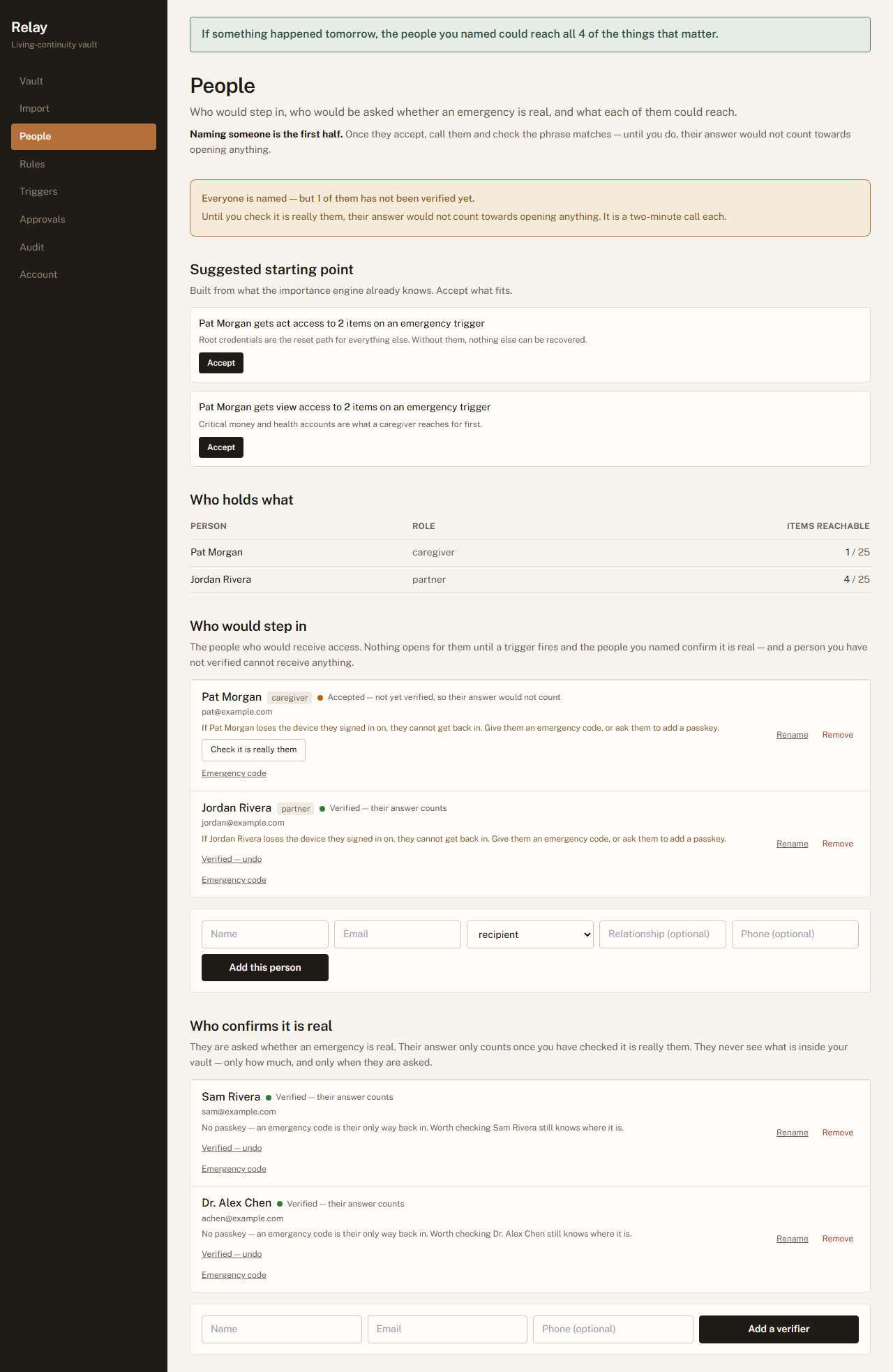
The People
screen: the coverage table, then the two rosters. Each person's line says what is still missing
rather than merely what state they are in.
1.3 — Decide who can reach what
You · the Rules screen
Why this exists. "My family gets everything" is not a plan, it is an
abdication. The person helping with your mother's care needs the health portal and the utility
account; they do not need your solicitor's file. Scoping access is what makes it safe to name more
than one person.
A rule is one sentence: this item → this person, under this kind of emergency,
to view or to act. You can build them by hand here, or accept the suggestions Relay
drafts from what it already knows about your items — most people accept the draft and edit two
lines.
Relay's drafted suggestions wait for you on the People screen, not this one.
View means read it. Act means use it — sign in, pay the bill, call the bank.
Reversible means access closes again when you check back in. This is the default and it
is the whole reason an emergency release is not frightening.
Release after N days holds a rule back. The urgent things open the moment a release
happens; the rest wait, and only open if you are still unreachable that many days later.
The person it is for sees the item on their list from the start, marked with the date it opens,
so they know something is coming rather than concluding the plan is broken.
Every rule you can write is reversible. The four situations you can
choose between — an emergency, a trip, a caregiving arrangement, something at work — all
close again when you check back in. Relay does not offer a permanent handover, and does not offer
estate or inheritance services or confer legal authority on anyone. If you need something to pass
on permanently, that belongs with a will and a solicitor, not here.
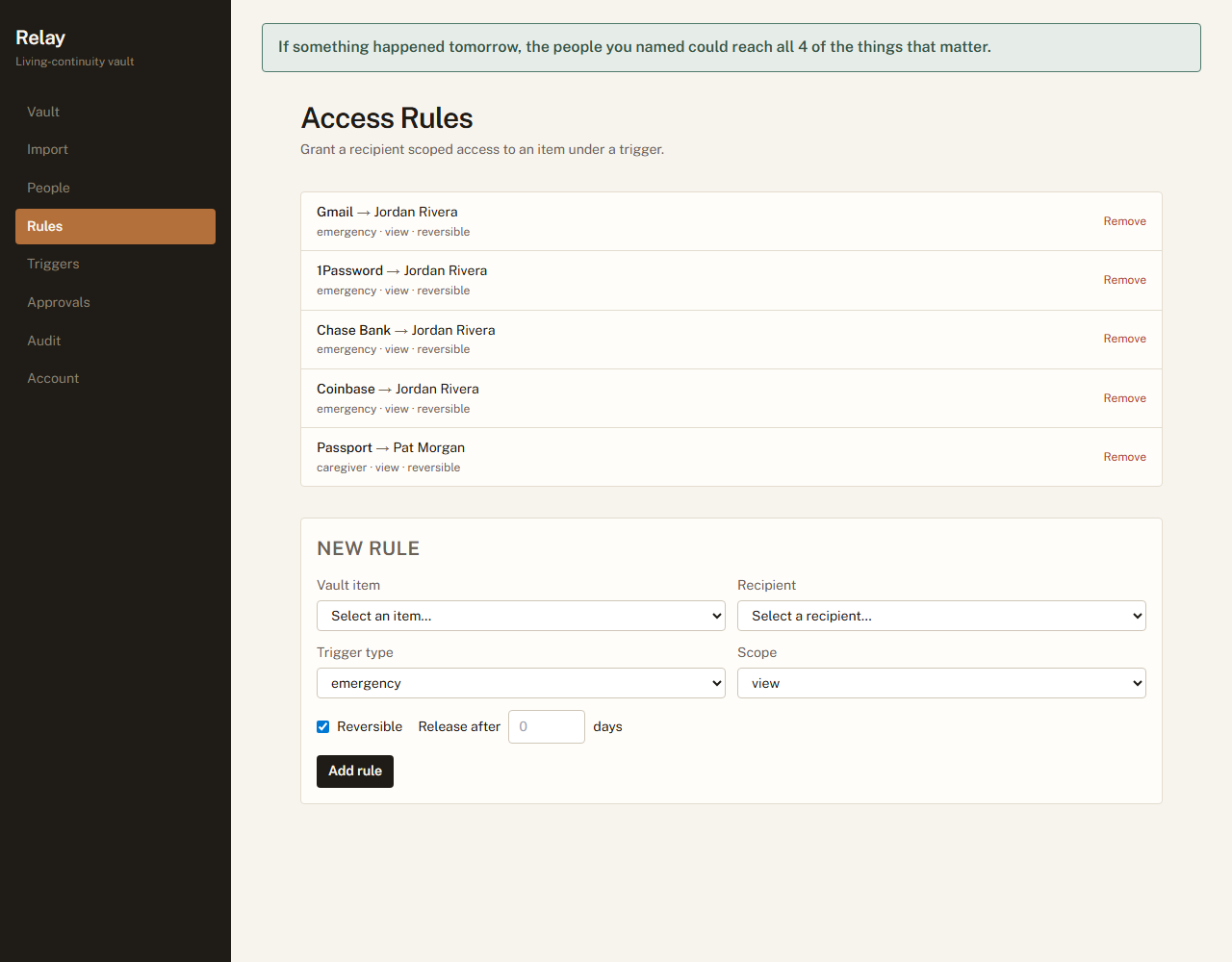
Existing rules
read as sentences. The trigger a rule is written for is created the moment you write the rule —
which is why an unused trigger never appears and can never fire.
1.4 — Set the conditions
You · the Triggers screen
Why this exists. The dangerous failure is not "it opened too late". It is
"it opened when nothing was wrong". Every default here leans towards staying shut.
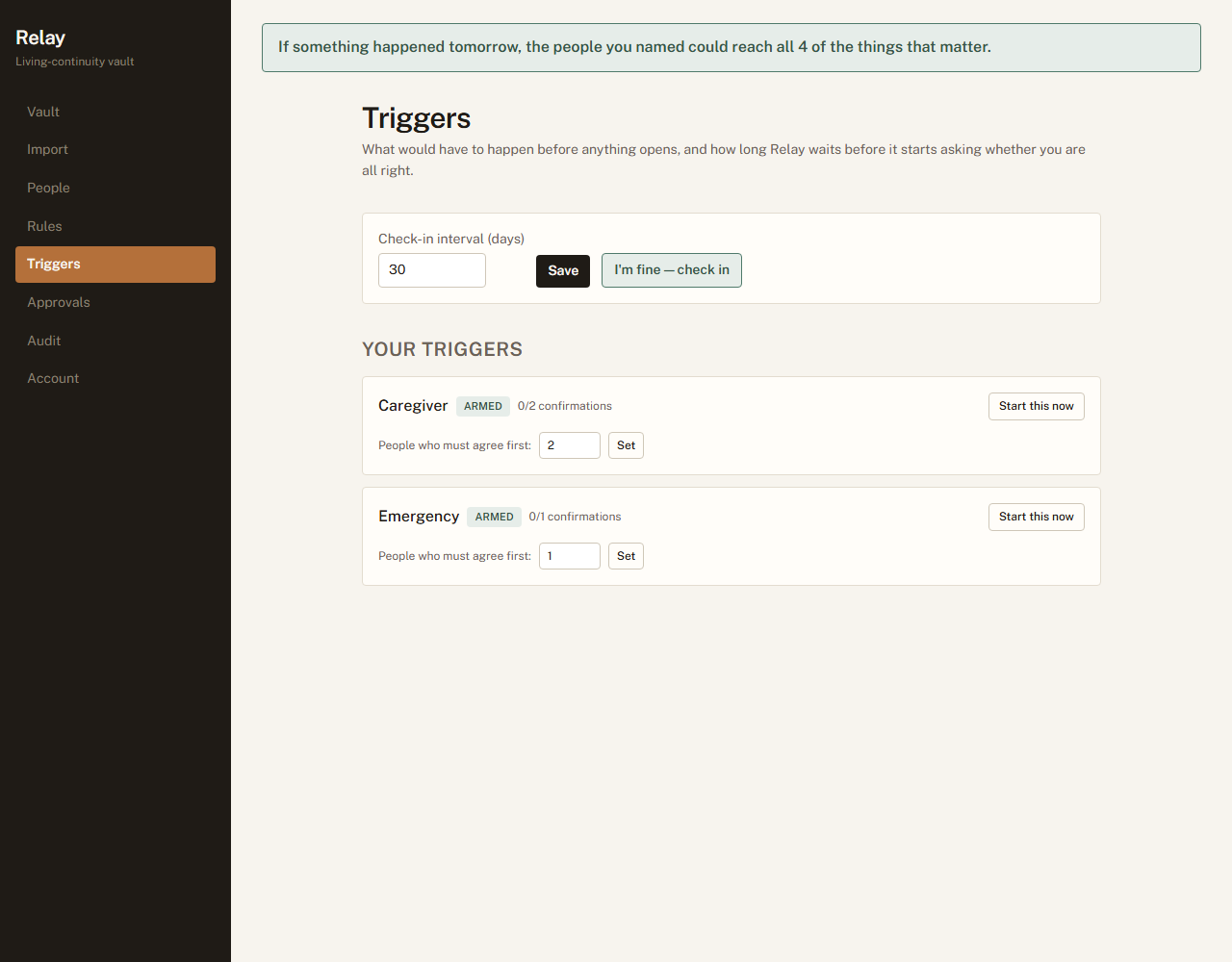
Two settings, and one button you will hopefully never press.
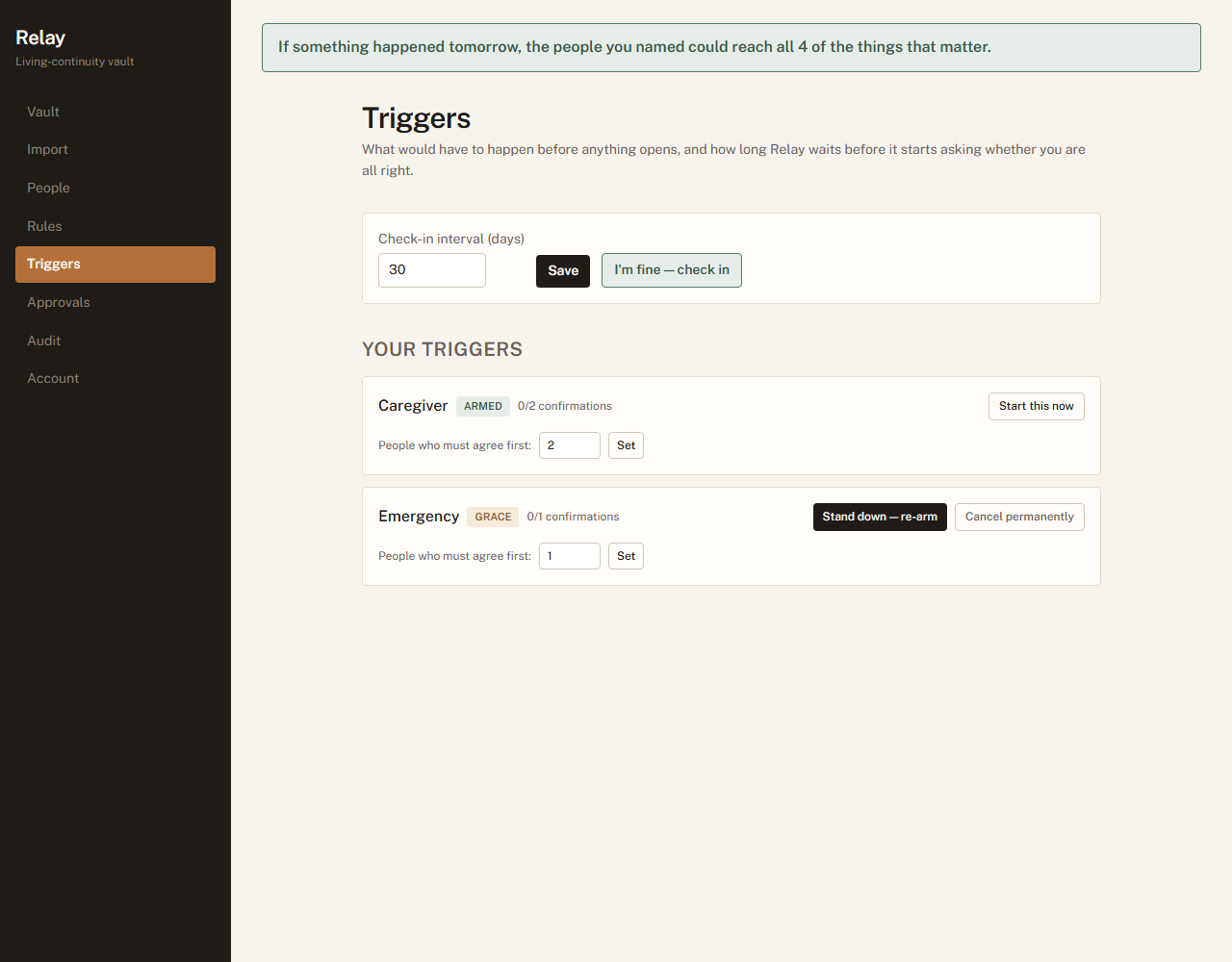
Check-in interval. How long Relay waits before it starts asking whether you are all
right. Thirty days suits most people. Any deliberate action in the product counts as checking
in, so ordinary use keeps it quiet — you are not being asked to remember a chore.
People who must agree first. How many of your verifiers have to say yes before
anything opens. One is enough for a small circle. Two is meaningfully harder to fake and is
worth it once you have three or more verified people.
Start this now fires that trigger yourself — the “I know I am about to be
unreachable” button. It still needs your verifiers to confirm; it does not skip anyone.
It asks you to confirm first, and tells you exactly what is about to happen rather than asking
whether you are sure.
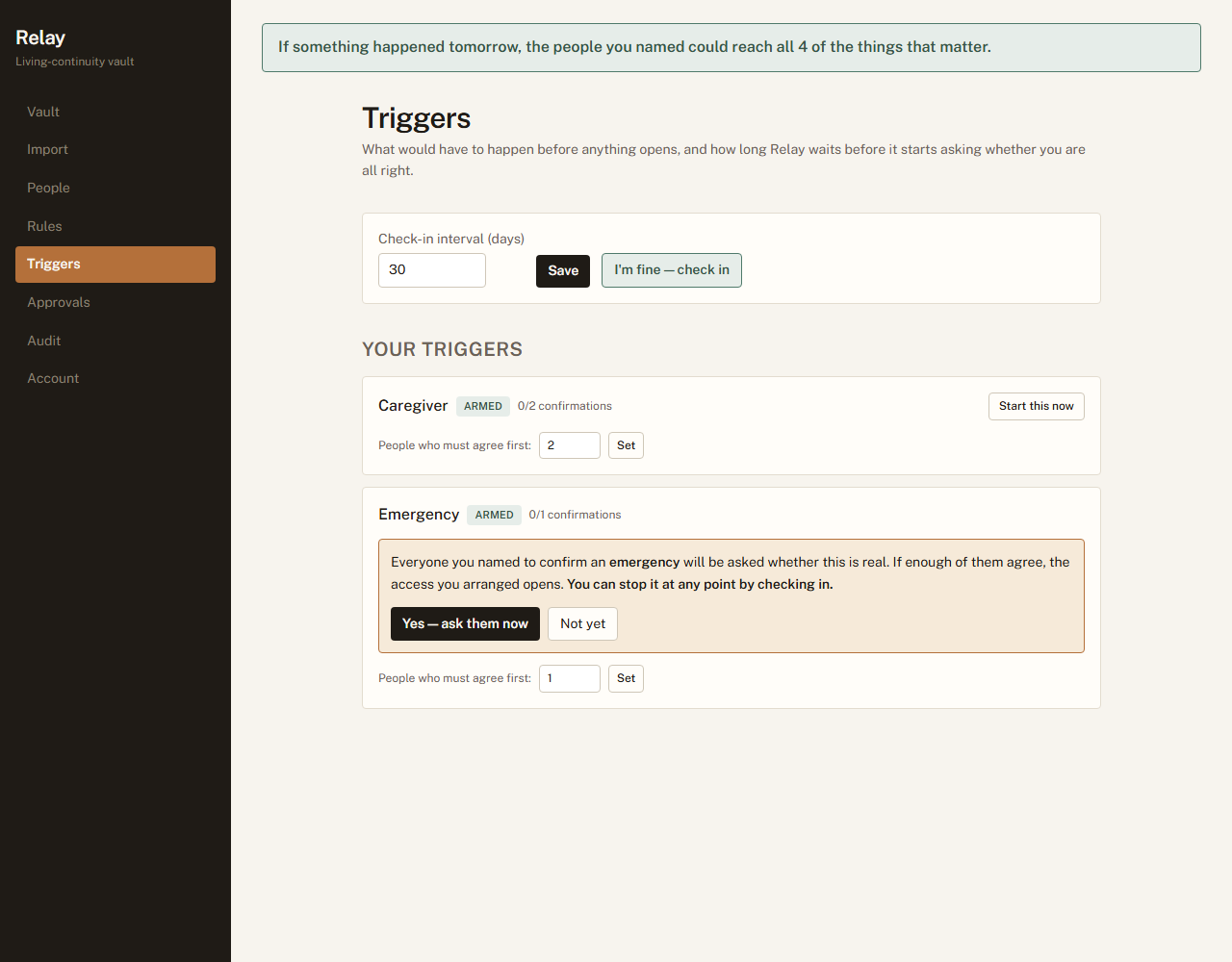
Starting one deliberately. It names the consequence, and says plainly that checking in stops
it — because “are you sure?” is a question nobody reads.A trigger
sits ARMED and does nothing until either you initiate it or you stop checking in. Armed is
the safe state, and every failure inside Relay resolves back to it.
1.5 — Someone to help you set it up
You · the Approvals screen
Why this exists. The person who most needs this is often the least likely to
do the typing — and the adult child who bought it is usually sitting next to them anyway. The
alternative, in practice, is that they sign in as you, which destroys every guarantee in this
document at once.
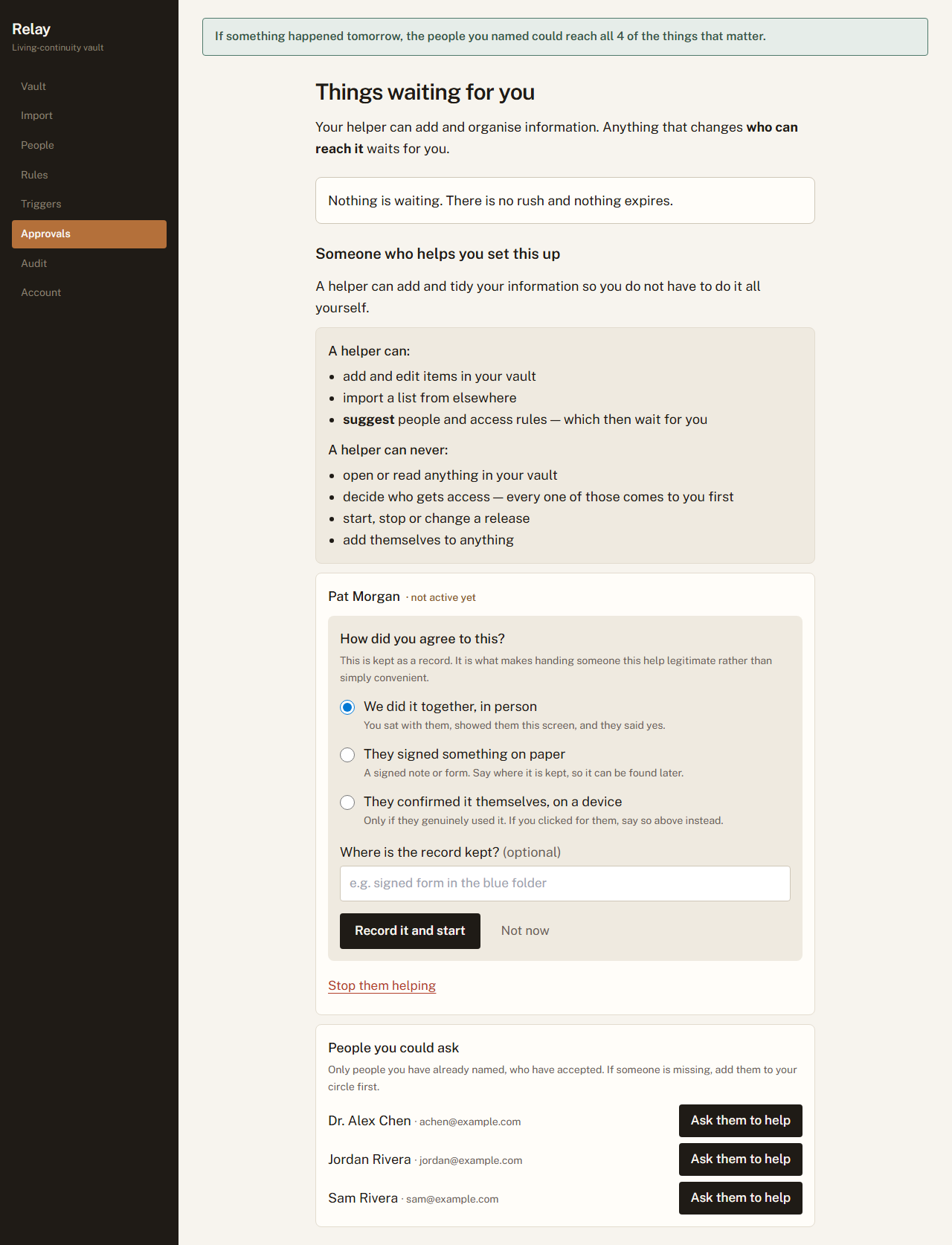
A helper can add and tidy your information. A helper can never open anything, decide who
gets access, or touch a release — anything that changes who can reach what comes to you as a
question. You choose them from people you have already named who have accepted, so this is always an
elevation of somebody known rather than an introduction of somebody new.
It does nothing until you record how you agreed to it — together in person, on paper, or
confirmed by them on a device. That record is not a formality: it is what makes handing somebody
this help legitimate rather than merely convenient, and it is why “in person” and
“on paper” are offered as equals rather than buried under a link.
Once it is recorded, they see it on their own screen and can start. Anything they suggest about
people arrives in your Approvals queue as a question, including — especially
— if they suggest themselves. Approving runs it through exactly the checks it would face if
you had typed it yourself.
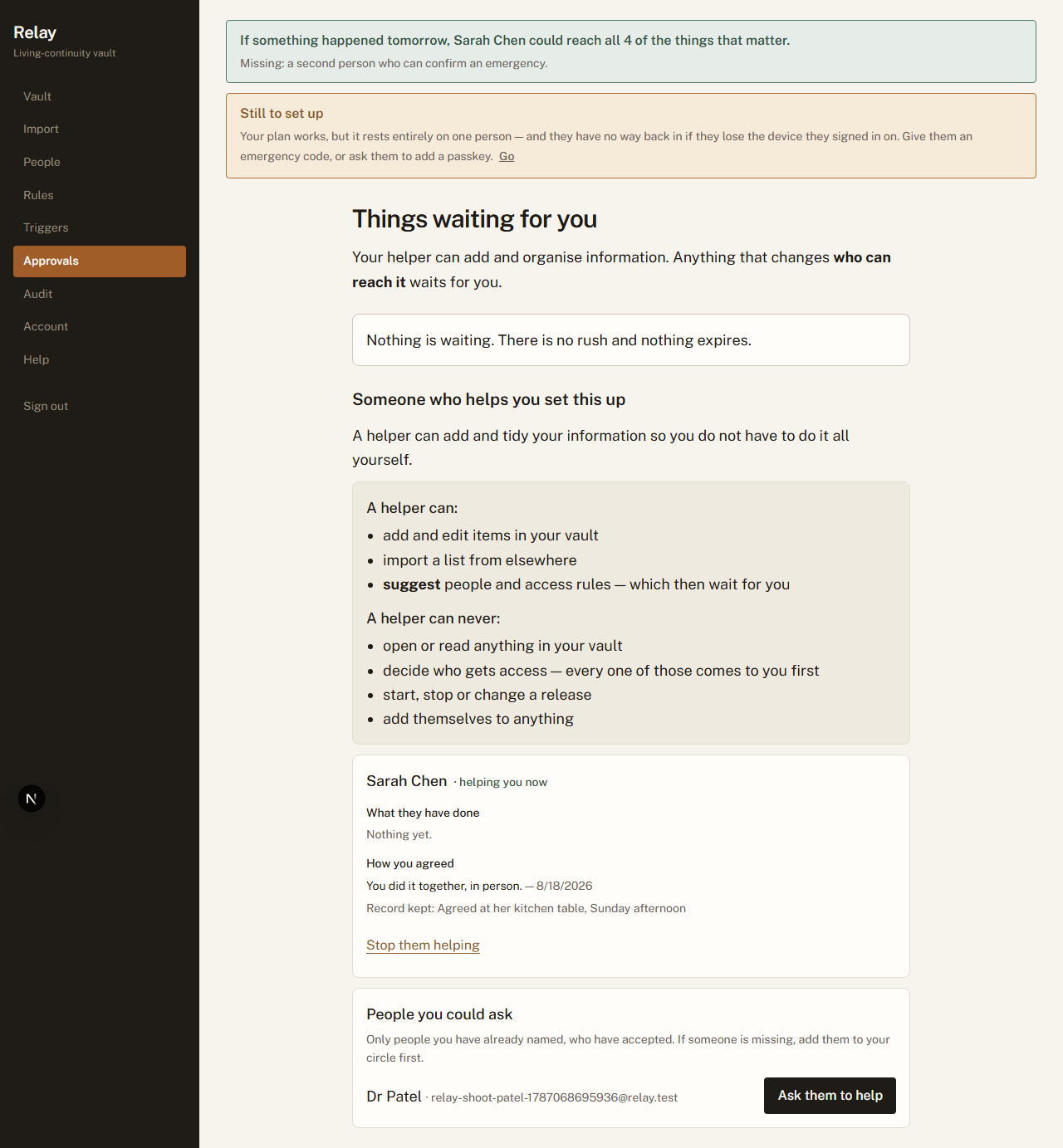
You can also see what they have actually done — each thing they added, each person
they suggested — on the same screen as the button that stops them helping. Everything they do
is also in your record, under their name.
The
record that starts it. Nothing works until this is filled in, and the option that invites a
convenient lie — “they confirmed it themselves” — is worded to discourage
one.Active,
with a suggestion waiting. What a helper can and can never do is stated before the button rather
than after it; what they have done sits directly above the control that stops them, so the
evidence is beside the decision it informs rather than a screen away.
Part 2
Living with it
This is the part that lasts for years, and the part most products get wrong by
demanding attention they have not earned.
2.1 — Knowing whether it would actually work
You · the banner on every screen
Why this exists. The worst outcome for a product like this is not failing.
It is appearing to work for four years and then failing on the one day it is needed. So the
banner is deliberately hard to satisfy and deliberately specific about what is missing.
It goes green when the plan could actually run — not when you have filled in every field. And
when it is not green it names the single fastest thing you could do next, rather than listing
everything imperfect about your setup.
What it says
What it means
Green
Enough verified people, enough coverage. If something happened tomorrow,
this works.
Nobody could confirm
You have named verifiers but not verified them, so nothing
can open. This is the most common state for a new plan and the phone call fixes it.
Your plan rests on one person
It works, but every verified person is needed and
at least one of them has no way back in if they lose their phone. Not urgent; worth an
afternoon.
2.2 — Making the call that makes it work
You · two minutes per person, once
Naming somebody is half of it. When they accept, four words appear on your screen and the same
four on theirs. Ring them, read yours out, and ask whether theirs match. If they do, mark
them verified — and only from that moment does their answer count towards opening anything.
If the words do not match, stop. It means somebody else opened the invitation you sent.
The same panel removes them, cancels the code, and puts them back to not-yet-invited so you can try
again on a channel you trust.
Your side
of the call. It is two minutes, it is not optional, and it is the only thing that can tell the
person you meant from somebody who intercepted the invitation.
2.3 — Keeping it current
You · the Vault, Rules and People screens
Why this is the part that actually decides whether it works. Setting this up
takes an hour once. Keeping it true takes a few minutes a year, and it is the difference between a
plan and a museum: a password rotated in 2027 and never updated here is an item your family will
open, read, and find does not work — at the worst possible moment, with no way to tell that
from a plan that was never any good.
Update a value.Update beside an item lets you correct both what it is called
and what it holds — the rotated password, the corrected account number — encrypted in
your browser exactly as the first one was. Relay cannot show you the old value, because it cannot
read it, so this replaces rather than edits it. Rules can be removed and rewritten. None of it needs
anybody’s permission and none of it is a support request.
What removal takes with it. This is the part worth knowing before you click rather than
after, because it is not obvious:
Removing an item also deletes every rule pointing at it. Nobody is left with a grant to
something that no longer exists.
Removing a person also deletes every rule and every draft policy written for them. If
they were the only one who could reach your bank, nobody can now — the banner will say so
immediately.
Removing somebody is permanent, so the screen asks first and tells you how many things
go with them. Re-adding the same person later creates a new place that has to be accepted and
verified again from scratch.
Names can be corrected, and one of them matters more than it looks.Rename beside a person fixes a spelling without disturbing anything else — they stay
verified, they keep their place, and no new code or phone call is needed. It is worth doing, because
their name is not decoration: it is what your people read in the message that matters
(“Margaret Chen has asked you to confirm an emergency”), on the one day it is hardest to
check whether a message is genuine.
An email address is different. Changing one is not offered, because a person who has already
accepted stays bound to the account they accepted with — so a new address would not move them.
If you sent an invitation to the wrong address, remove them and invite again.
Removing is not the same as somebody stepping down. When you remove
them, they are gone and their rules go too. When they step down, their place survives, empty
and red, waiting for you to decide — see 5.7. The difference exists so that nobody can quietly
shrink your circle, including you in a hurry.
2.4 — Checking in
You · anywhere
Signing in and changing something is a check-in. Adding an item, editing one, writing a
rule, naming somebody, answering a helper’s suggestion, setting your name — all of it
resets the clock, so ordinary use keeps things quiet and you are not being asked to remember a
chore.
Reading is not a check-in, and that is deliberate. A phone left signed in on a hospital
bedside table will load pages for days without anybody touching it. If that counted, the one
situation this product exists for would be the situation in which it quietly did nothing.
There is also an explicit I’m fine — check in button on the Triggers screen for
when you want to be certain rather than incidental. A check-in does three things at once: it resets
the clock, it reverses a release that is in progress, and it closes access that has already opened.
One action, all of it.
2.5 — Somebody asks, and you are fine
You · the Challenge screen
Why you are asked first. If a person you named needs something before any
trigger has fired, the polite version of that is a question to you — not a mechanism that
routes around you.
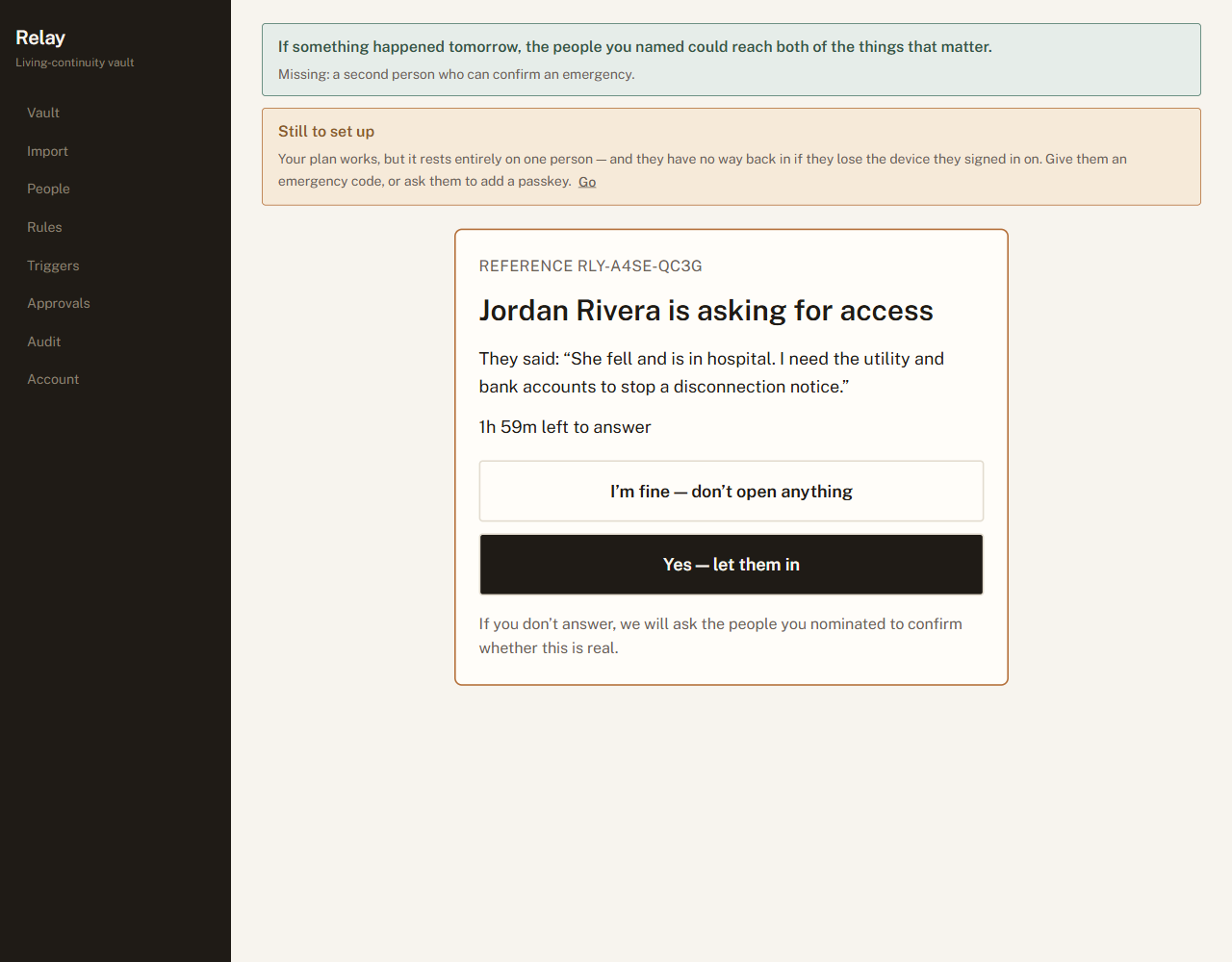
You see who asked, in their own words, and how long you have to answer. Say you are fine and
nothing opens. If you cannot answer in time, the people you chose to confirm an emergency are asked
instead — which is the point: it does not depend on you being reachable.
Everyone else you named is told a request was made, whatever you decide. That is deliberate, and
it is what makes a quiet attempt on your accounts impossible.
The
question, with a countdown and both answers.
2.6 — Reading what happened
You · the Audit screen
Why this exists. Coming home and finding that people could see your accounts
is unsettling even when everything worked exactly as designed. The record is what converts that from
a vague unease into something you can actually check.
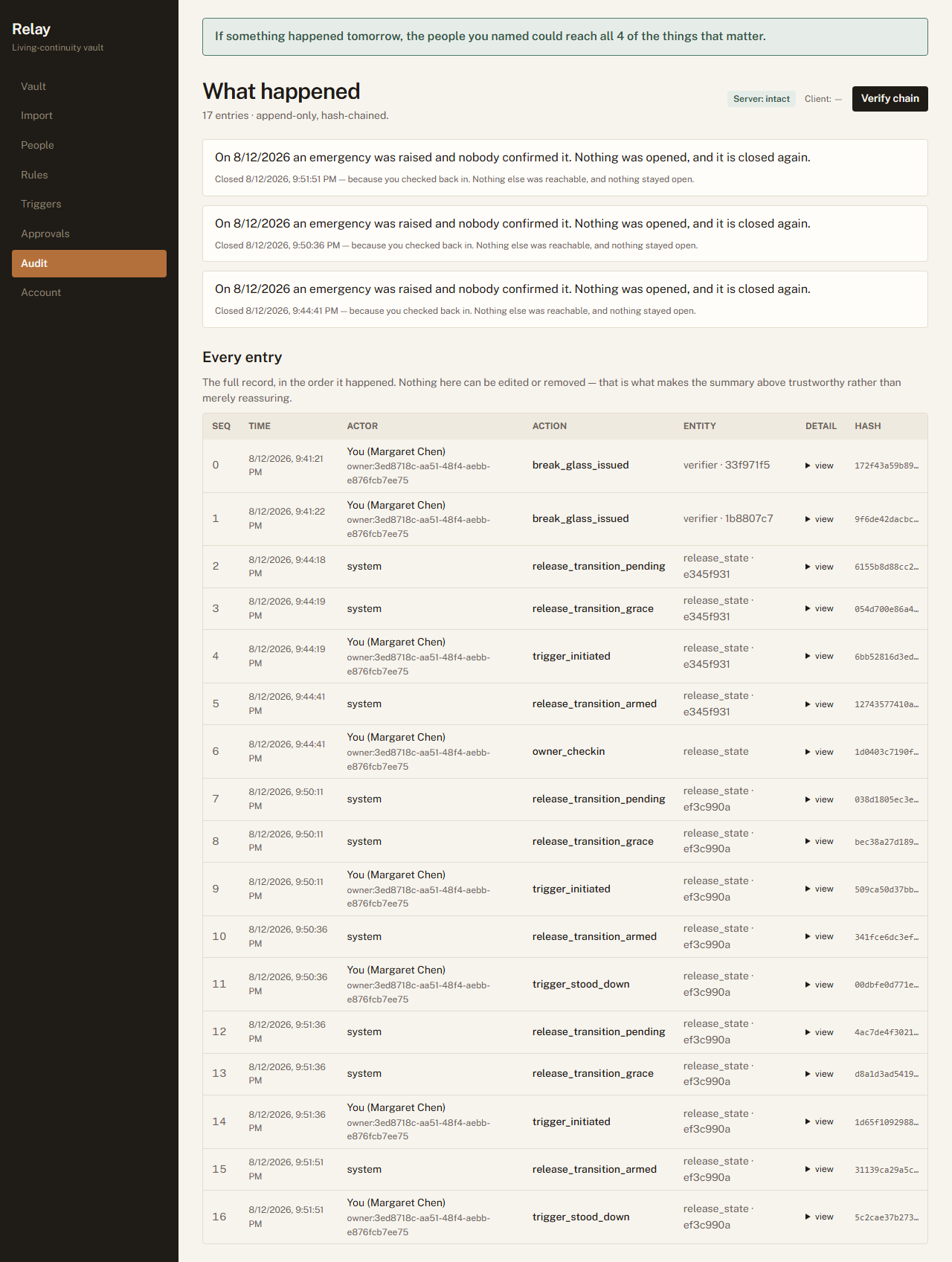
The top of the screen is the story in sentences: what was raised, who confirmed it, what was
opened, when it closed, and why. Beneath it is every entry in order, hash-chained so that changing
any one of them breaks the chain visibly. Verify chain re-computes it in front of you.
It distinguishes two things that are easy to conflate: somebody seeing what was set aside
for them, and somebody opening it. If your partner signed in and looked at the list without
revealing anything, the record says exactly that rather than telling you nothing happened.
The summary
answers the questions a person actually has. The table beneath is the proof that the summary is
not just a nice sentence.
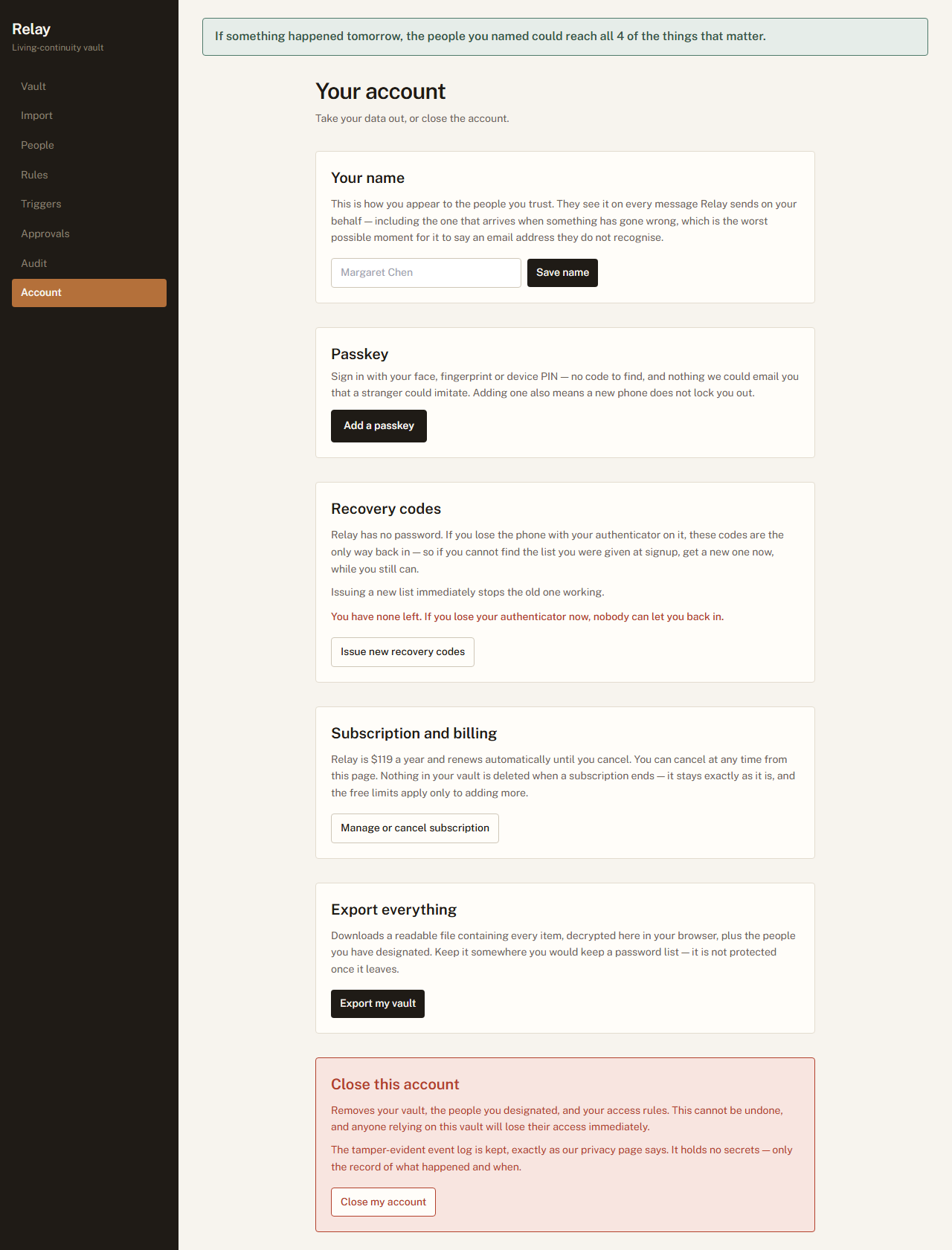
2.7 — Your account
You · the Account screen
Five things worth doing once, and one you may never need.
Your name. This is how you appear to everyone you trust. Set it. An emergency message
that says someone@gmail.com instead of "Margaret" is the worst possible moment for
your family to wonder whether the message is real.
Passkey. Your face, fingerprint or device PIN. Nothing to remember and nothing anyone
can email you that a stranger could imitate.
Recovery codes. Relay has no password. If you lose the phone with your authenticator
on it, these are the only way back. The page tells you how many you have left —
they are used up one per use, and running out quietly is the failure worth avoiding. Issue a
fresh list any time; doing so stops the old one working.
Export everything. A readable file of every item, decrypted in your browser. Your data
is yours and leaving is not punished.
Subscription. Cancel any time. Nothing in your vault is deleted when a subscription
ends — the free limits apply only to adding more.
Close this account. Removes the vault, the people and the rules. Anyone relying on it
loses access immediately, and this cannot be undone.
Leaving is a
first-class path, not a support ticket — export first, then close. The recovery line changes
colour as the sheet runs down, because “1 left” in the same grey as everything else is a
fact nobody acts on.
Part 3
For the people you name
Hand this part to them. It is written to be read by someone who has just been asked
to do something they did not sign up for.
3.1 — Someone has named you. What now?
Your person · the Accept screen
Why you are being asked to do anything at all, in advance. The alternative
is that the first time you hear from Relay is during an emergency, in an email, asking you to make a
decision about someone you love while holding a code you have never seen before. Accepting now — on
a calm Tuesday — means that on the bad day you simply sign in as yourself. There is nothing to
intercept, because nothing is sent.
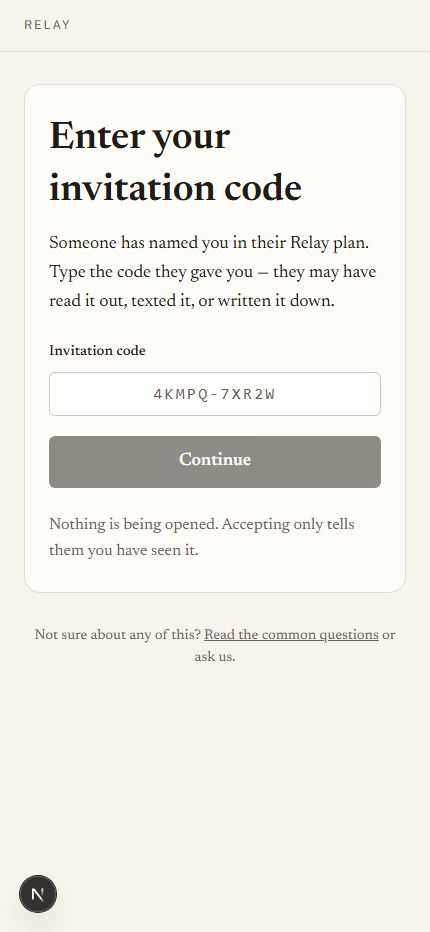
How it works. The person who named you gives you a short code. They choose how: read out
on a call, texted, written down, handed over. You type it in, and you have an account. It is free,
it holds nothing of yours, and it exists so you can be recognised later.
Accepting does not open anything. It does not give you access to their
vault, and it does not tell them anything except that you have seen it. If you would rather not be
part of this, the honest thing is to say so — and there is a control for stepping down at any
time.
Typing a short code rather than clicking a link. That is deliberate: Relay never sends a link that
signs you in, so a message with one in it is not from us.
3.2 — Standing by
Your person · their Standby screen
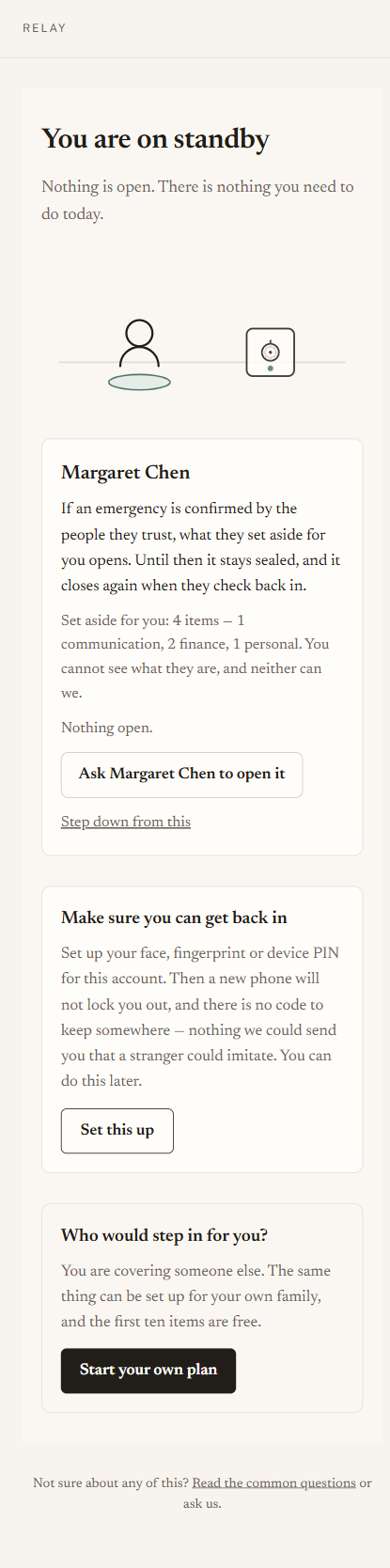
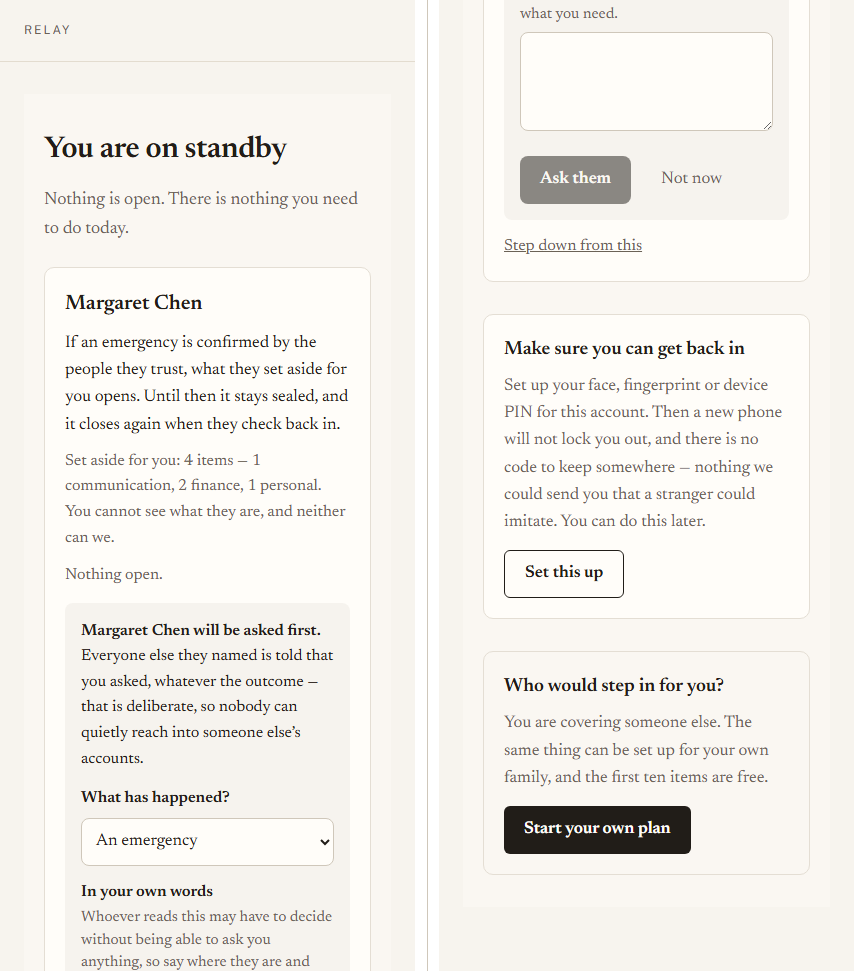
Most of the time this screen says the most valuable thing it can say: nothing is open, and
there is nothing you need to do today. It shows who you are standing by for, what would happen
if an emergency were confirmed, and — if you are a recipient — how much has been set aside for you,
as counts and categories. Never titles. Never contents.
It also offers to set up a passkey. Worth doing: it is what lets you get back in on a new phone
without anyone having to reissue anything, and it means there is no code to keep track of.
You can stand by for more than one person. Both parents, a parent and a neighbour, a spouse
who named you and a friend who did too — each appears as its own card with its own four words,
its own way to ask, and its own way to step down. They are genuinely separate: stepping down from one
does not touch the others, and nothing you are told about one person is visible on another’s
card. You can also have a vault of your own on the same account — being the person somebody
relies on and having your own plan are not alternatives.
If something is set to open later. The person who named you may have staged part of it
deliberately — the urgent things immediately, the rest only if they are still unreachable a
week on. Those appear on your list from the start with the date they open, so a gap on the day is a
plan working as written rather than something broken.
Standing by. Step down from this is always available — being named is not a trap,
and someone who quietly stopped agreeing is worse than useless in an emergency.
3.2a — What Relay gives you, and what it does not
Your person · the first screen after access opens
The first time access opens for you, before you see anything, Relay says plainly what this is:
the owner chose to share these items with you, and that is all it is. Relay does not make you an
executor, an agent or a representative. The companies behind those accounts have agreed to nothing,
and using someone else’s credentials may breach that account’s terms whatever your
reason.
If the person who named you has died, the one with authority is their executor or personal
representative — speak to them first. You will be asked to acknowledge this once, and the
acknowledgement is written to the owner’s record along with everything else.
Why we say it rather than leave it implied. A product that hands over
credentials silently is doing something different from one that hands them over while naming the
limits. Most people reading it are a daughter with her mother’s permission and have nothing to
worry about; the point is that Relay should not imply an authority it cannot give anybody.
3.3 — Asking them to open it
Your person · their Standby screen
Why this exists. The other paths all wait for something: for you to have
anticipated the emergency, or for a check-in interval measured in weeks to run out. The commonest
real case is neither — somebody is in hospital now and the person who would help needs
to ask.
Next to “nothing is open” there is a control to ask. It says plainly, before the form
is even shown, what asking costs: you are asked first, and everyone else you named is told
that a request was made, whatever the outcome. That is deliberate rather than a side effect
— it makes a quiet, covert attempt at somebody’s accounts impossible.
You then have a window to answer. If you cannot, the people you chose to confirm an emergency are
asked instead — so it does not depend on you being reachable, which is the entire point. Nobody
can wear you down with it either: three requests in twenty-four hours is the limit.
One tall screen, laid out as two columns — read the left side, then the right. Asking. What it costs is said before the form, not discovered
afterwards.
3.4 — If they asked you to help set it up
Your person · their Helping screen
Why this exists. The person who most needs a plan like this is often the
least likely to do the typing. The realistic alternative is that you sit down and log in as
them, which quietly destroys every guarantee in this guide at once. This is the same help, done
in a way that leaves the guarantees standing.
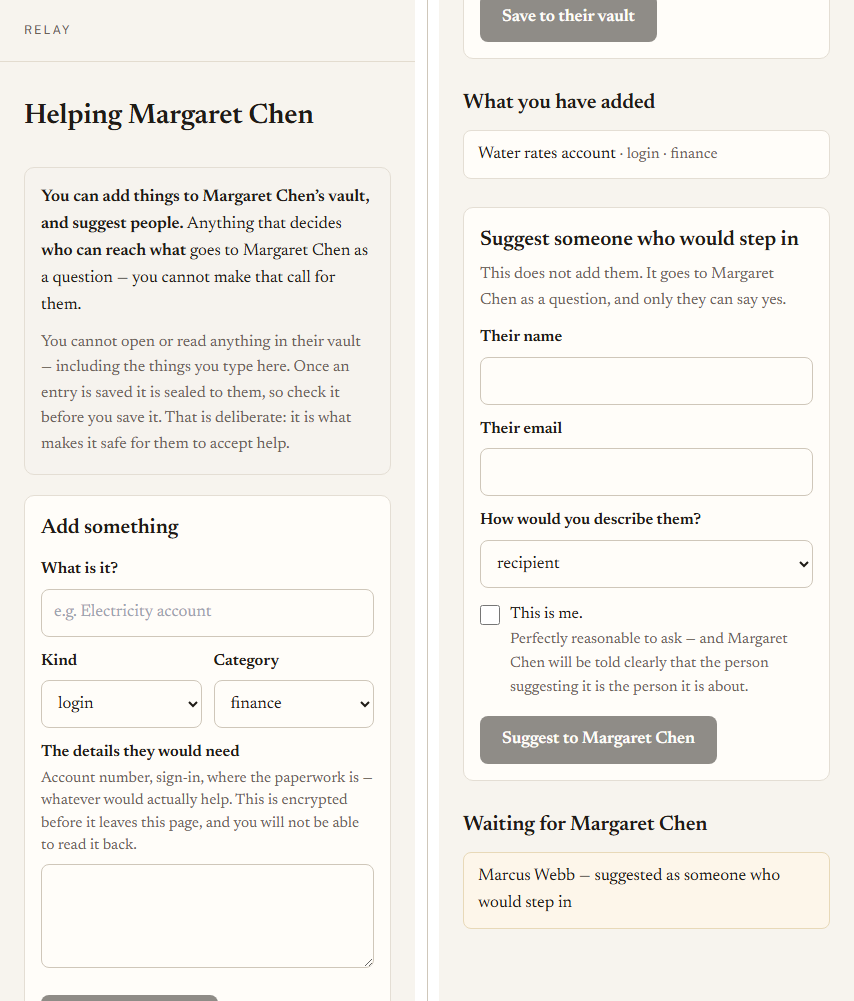
What you can do. Add things to their vault — the account numbers, the sign-ins,
where the paperwork is — and suggest people who should be able to reach them.
What you cannot do, and this is the point. You cannot open or read anything in their
vault, including what you type yourself: an entry is sealed to them the moment you save it,
so check it before you save. You cannot decide who reaches what — every such suggestion goes
to them as a question. You cannot touch their triggers, and you cannot add yourself to anything.
If you think you should be on their plan, you can suggest exactly that, and they will be told
plainly that the person suggesting it is the person it is about.
One tall screen, laid out as two columns — read the left side, then the right. The helper’s screen. What you can do and what you can never do sit above the
tools, so you never have to find the edge by hitting it.
3.5 — The phone call
Both of you · two minutes, once
Why this exists. Between the moment a code is sent and the moment it is used,
it is a secret sitting in a message. If somebody else got hold of it and accepted in your place,
they would look — from every angle the software has — exactly like you. This call is the only thing
that can tell the difference, and it works for one reason: it happens over a channel an impostor
cannot reach.
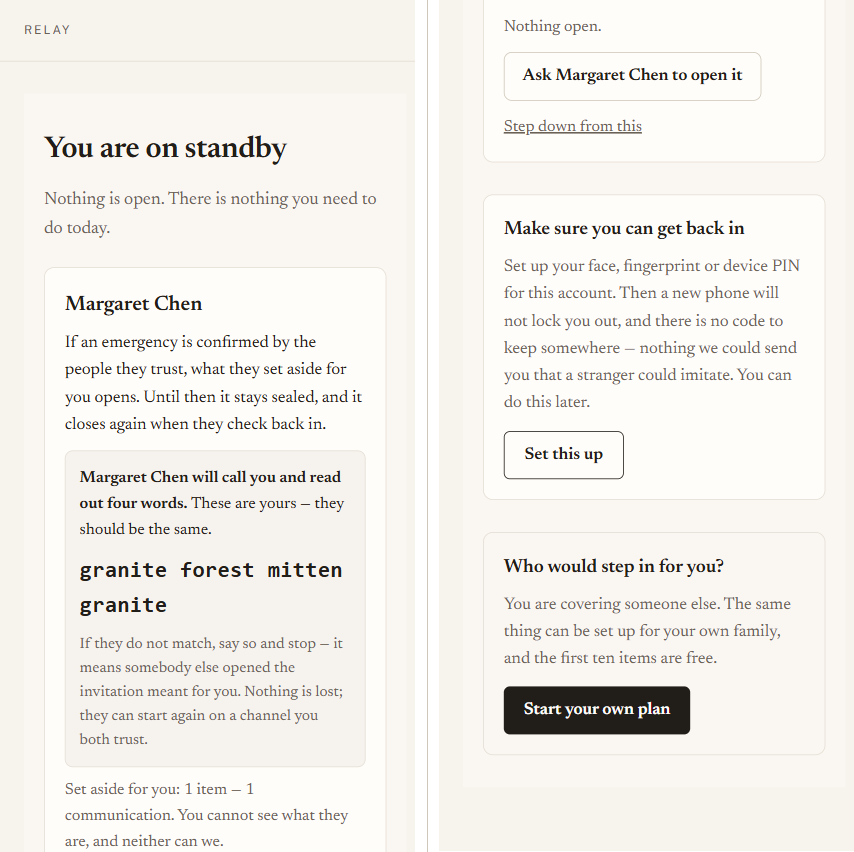
After you accept, four words appear on your screen. The person who named you has the same
four on theirs. They ring you and read theirs out; you say whether yours match.
If they match, they mark you verified and your answer starts counting — until then it would not
open anything. If they do not match, say so and stop. It means somebody else opened the
invitation meant for you. Nothing is lost: they can cancel it and start again on a channel you both
trust.
Your side of the call. The words are not a password — they are a comparison, and they are worth
nothing to anybody who is not on the phone.
Part 4
The day it matters
What actually happens, in order, and who is asked what.
4.1 — Something starts it
Either you initiated a trigger yourself, or you stopped checking in for longer than your interval
and Relay began asking. The trigger moves from ARMED to PENDING. Nothing has opened.
4.2 — Your verifiers are asked one question
Your verifiers · the decision screen
Why a question and not a notification. A notification that fires
automatically is a system that can be gamed by waiting. A person who knows you, answering "is this
real?", cannot be.
Each verified verifier is contacted. What they receive depends on how they are set up, and only
one case involves anything secret:
If they…
They receive
have a passkey or an authenticator
A message telling them to sign in.
No code, nothing to intercept.
are verified but have no way to sign in
A single-use code that expires in 72
hours. They need it; nobody else does.
were named but never verified
A message saying plainly that their answer would
not count yet. Better than letting someone believe they helped.
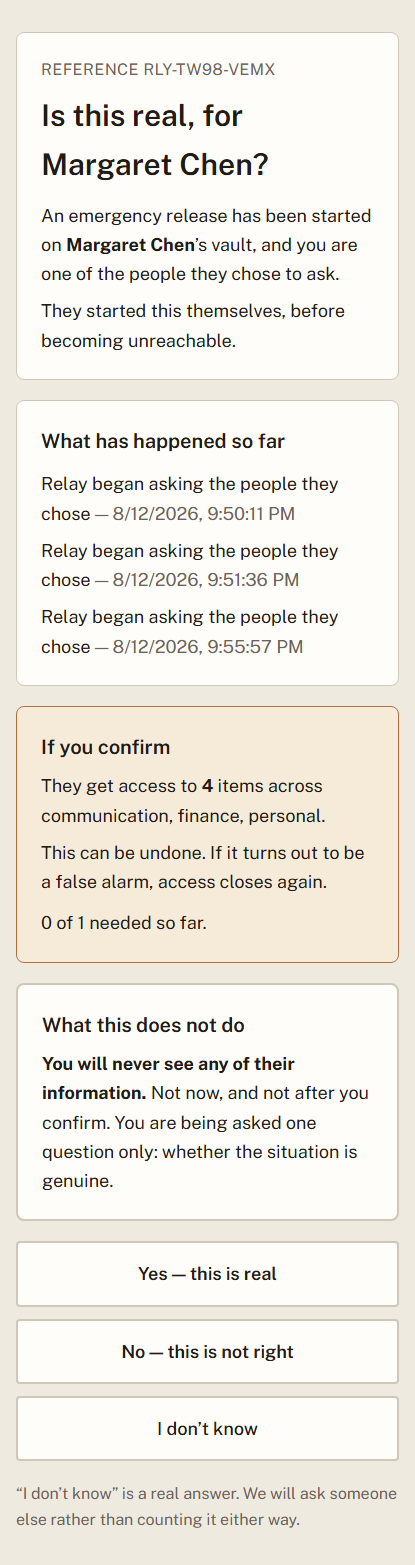
They are shown how much is at stake and what kind of thing it is, so they can judge
whether the request is proportionate. They are never shown a title and never shown contents. They
can answer three ways — yes, no, or I don't know — and "no" is offered with
exactly the same prominence as "yes".
The question itself. It names whose vault it is, says why it is being asked now, shows
how much is at stake and never what — and offers all three answers at the same weight, because a
page that leans on “yes” produces more of them.
4.3 — You are told, immediately
The moment enough people agree, you are told on every channel Relay has for you — and the access
you arranged opens. There is no waiting period, and the product no longer implies one.
What protects you is not a delay — it is that you can undo it. An
earlier version of this message said release would complete “when the grace window
elapses” and invited you to “check in now to cancel”, which was a race you would
lose: for everything Relay offers today there is no waiting period at all. Checking in afterwards
closes it immediately. That is the real guarantee, and unlike a countdown it does not depend on you
being awake at the right moment.
Relay has no permanent handover at all — nothing it does is irreversible. See Part 6.
4.4 — Access opens
Your recipients · their screen
Only now does anything open, and only what your rules assigned. Someone who accepted a standby
account signs in as themselves; someone who never accepted receives a single-use code that lasts 24
hours. In both cases, decryption happens in their browser — Relay itself still cannot read the
items.
Before any item is shown, the plan opens with its limits — what this access is, what it is not,
and what to do first if you have died — and the person acknowledges them. Then each item is opened
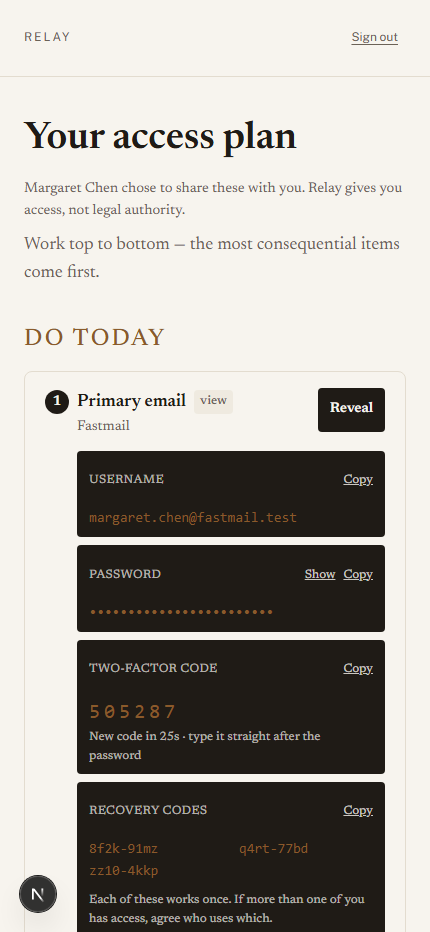
only when they press Reveal, and what appears is built to be used at the worst
moment: the username in the open, the password masked until they choose to show it, and — if you
stored the second factor — a working six-digit code counting down, with the instruction to type it
straight after the password. Your note, if you left one, is right there with it.
What your recipient actually sees: labelled fields, a masked password, and a live
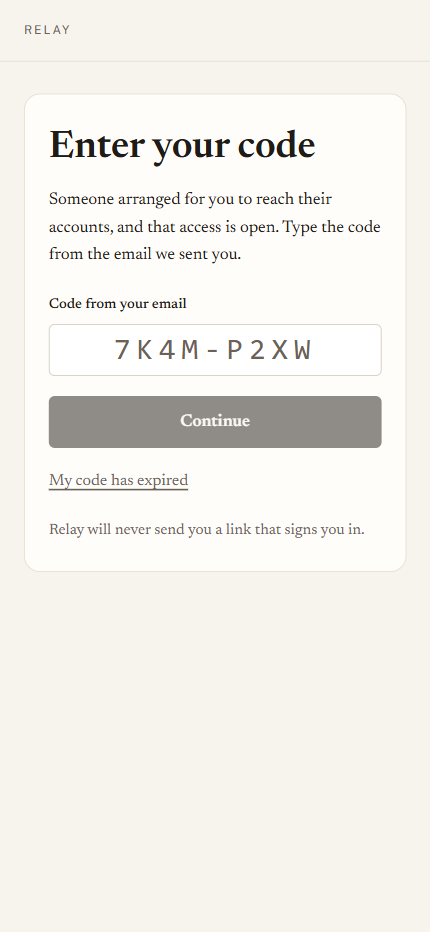
code. Work top to bottom — the most consequential items come first.The recipient's way in when they never accepted a standby account. My code has
expired re-sends to the address already on file — never to one typed here.
4.5 — It closes again
You check in. Every reversible grant closes, tokens stop working, and the whole episode becomes
a paragraph on your audit screen. Nothing needs to be undone by hand.
4.6 — And if you never come back
Your family · the question they will actually ask
Why this needs saying out loud. Everything above is written around your
return, because that is the common case and the one other products handle badly. But the case a
family actually worries about is the other one, and a continuity product that does not answer it
plainly is asking to be trusted on the strength of an omission.
What was opened stays open. Access closes when you check in — and only when you check
in. If you never do, it does not lapse, expire or quietly withdraw. The people you chose keep what
you gave them for as long as they need it. Nobody else can close it on your behalf: not your other
contacts, not us.
What was not opened stays shut. Only the rules written for the trigger that fired are in
force. An item nobody was scoped to still has no route to anybody, and no further release happens on
its own — if a second situation arises, the people you named have to agree to that one too.
This is not a will, and it does not become one. What your family gets is
continued access to accounts and instructions — enough to keep a household running, pay what
must be paid, and reach the people who need reaching. It transfers nothing, settles nothing and
proves nothing to a bank, a registry or a court.
A permanent handover that would speak to any of that is not something Relay offers, and is not
coming (Part 6). Whoever tells you what a will and a power of attorney should say
is still the person to ask.
Part 5
When something goes wrong
The paths that matter most are the ones nobody rehearses.
5.1 — It was a false alarm
You · the Triggers screen
Stand down — re-arm stops a release in progress or closes one that has already opened, and
puts the trigger back to armed and ready. This is the control you want almost every time.
Cancel permanently retires the trigger for good. It is deliberately separated and asks for
confirmation, because someone stopping a false alarm at speed must not retire their whole plan by
reaching for the innocuous-looking word on the screen.
A
release in flight. Both ways to stop it are here, and they are deliberately not equal in
weight.
5.2 — You lost your phone
You · Get back in, from the sign-in screen
Why this is the case to plan for. Relay has no password, so the authenticator
on your phone is how you prove who you are. Over the horizon this product is meant to cover —
years, not months — that phone will be replaced, lost or broken at least once. This is not the
unlikely path; it is the expected one.
Lost your authenticator? on the sign-in screen takes you to Get back in. You give
your email address and one of the recovery codes you saved when you created the vault. Each
code works once. You then set up an authenticator again — on the new phone — and
everything else is exactly as you left it.
Nothing in your vault is touched by this. Recovery replaces how you sign
in. It does not decrypt anything, it does not open anything for anybody, and it does not disturb your
people, your rules or your triggers.
If you have no codes left, nobody can let you back in — including us.
That is the same encryption promise working in the direction that hurts. The Account screen shows how
many you have left and colours the line as it runs down; issue a fresh list before it does. A new
list stops the old one working, so keep only the newest.
If you have already lost the phone and the codes, your vault cannot be opened by you. It
can still be opened by the people you named, in the way it was always going to be: they confirm an
emergency and what you set aside for them opens. That is worth knowing before it happens rather
than after.
5.3 — Someone else lost their phone
Your person · the Emergency code screen
Why this exists. Not everyone owns a smartphone, and everyone eventually
loses one. Without this, the seventy-year-old you most want to include is excluded by their own
technology, and anyone whose authenticator is at the bottom of a river has to reach you — when you
may be exactly the person who cannot be reached.
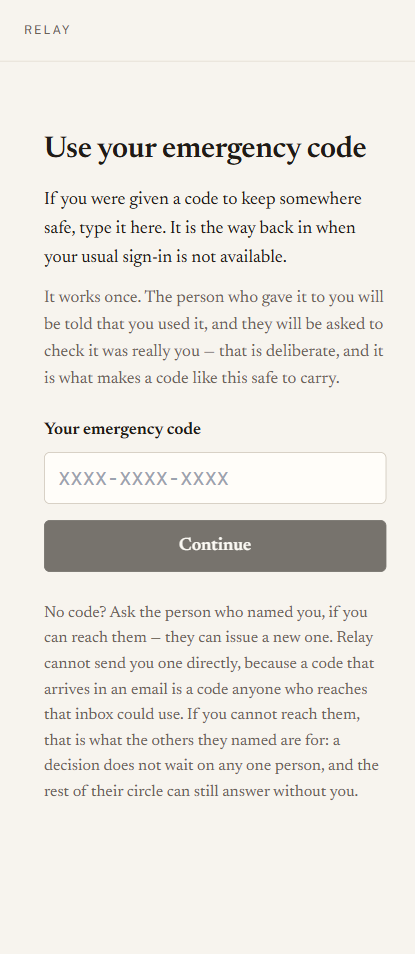
You can issue anyone an emergency code, in calm, to keep somewhere safe. It works once. When it
is used, you are told, and you are asked to check it was really them.
Issue these in advance, not during the emergency. A code you would have to
issue while unconscious is not a fallback. The banner will tell you when your plan depends on
somebody who has no way back in.
The way back in when the usual sign-in is gone.
5.4 — The code never arrived, or ran out
Your person · the code screen
Both the access screen and the confirm screen carry “my code has expired, or never
arrived”. It sends again — to the address already on file, never to one typed in, so
it cannot be used to redirect anything at somebody else. What arrives depends on how that person is
set up: a reminder to sign in if they have a passkey, a fresh code if they do not.
This matters most for the people confirming an emergency, because one of them being stuck holds
up everybody else. If they still cannot get in, the others who were asked can still answer.
5.5 — Somebody cannot use an account at all
You · the People screen
Some people will never accept — no smartphone, no interest, no email they check. Marking them
emergency code only tells Relay that this is deliberate, so it stops asking you to chase
them. It is honest rather than quiet: it also says clearly that they will never count towards your
plan working, and the banner arithmetic gets louder, not softer.
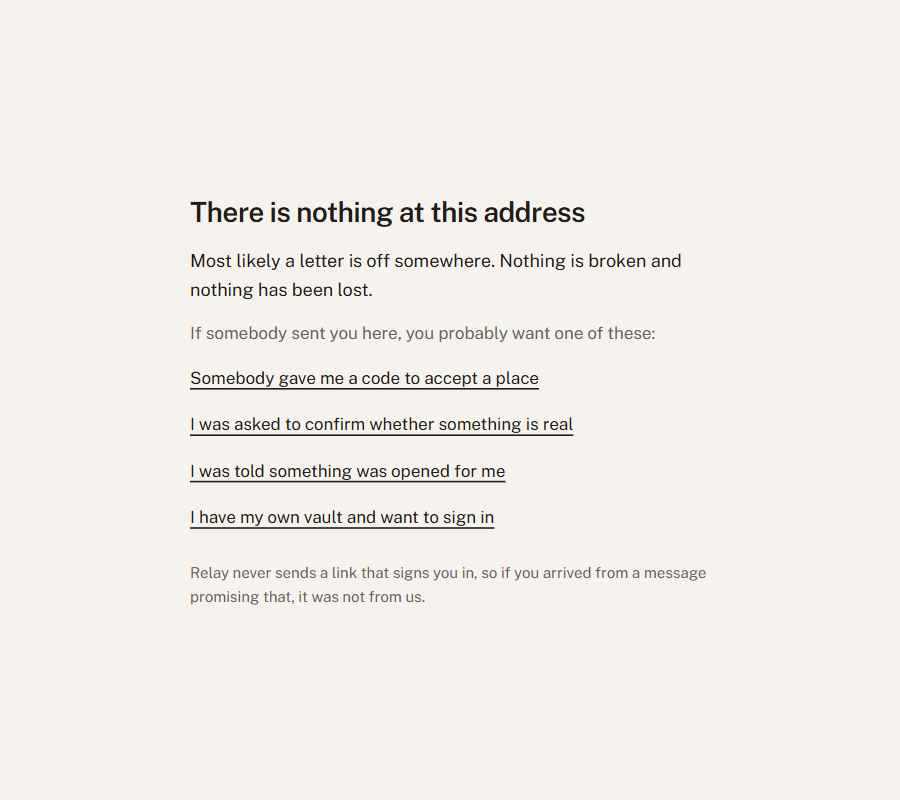
5.6 — A page will not load, or the address is wrong
Anyone
If you land somewhere that does not exist — a letter off in an address read out over the
phone — you get a page that says so and points at the four places you were probably trying to
reach. If something breaks instead, the page tells you the one thing that matters: nothing has
been lost and nothing has been opened. A page failing to load is not something changing.
Either way we are told automatically, so it does not depend on anybody reporting it. What reaches
us is a reference number and the address — never anything you typed.
Written for
somebody who mistyped an address in a hurry, not for an engineer.
5.7 — Somebody wants out
Your person · their Standby screen
Step down from this removes them, emails you, and recalculates your plan. Someone who no
longer wants the responsibility is not a safe person to depend on, so making this easy is a safety
feature rather than a courtesy.
The message distinguishes two things that look identical on a roster and are not. “I am
stepping down” is a decision to respect. “I do not know this person”
usually means your invitation reached the wrong address, and the right next step is to check the
address before sending another — an invitation sitting in a stranger’s inbox is exactly
what the phone call afterwards exists to catch.
5.8 — You want out
You · the Account screen
Export everything first — it is a readable file, decrypted in your browser. Then close the
account. Everyone relying on it loses access immediately. The tamper-evident event log is kept, as
the privacy page says: it holds no secrets, only the record of what happened and when.
Part 6
What Relay will not do
Stated plainly, because a product that overstates itself in this category is
dangerous rather than merely disappointing.
It will not open on its own. Silence never resolves towards open. If nobody confirms,
nothing happens — which is the correct failure, and it means a plan whose people cannot be
reached is a plan that does nothing.
It will not decide anything for your family. It carries a decision your people make. It
does not make one.
It cannot read your items, and cannot recover them for you. The encryption that keeps
them from us keeps them from us in every circumstance.
It will not make an unverified person count. Naming someone is not verifying them. The
phone call is not optional, and no amount of setup substitutes for it.
It does not do estates, and it is not going to. A permanent handover was designed and
built, and it was then withdrawn: as of August 2026 it is not offered, not scheduled, and not
waiting on anything. Everything you can choose is reversible. Relay is not a will, gives nobody
legal authority, and will not settle an estate or replace advice from somebody qualified to give
it. If an owner never comes back, what was opened stays open — that is described in
§4.6, and it is access, not inheritance.
It cannot help someone who has neither accepted nor been given a code. That person is
excluded by design, the product says so plainly rather than showing a hopeful amber light, and
the fix is always the same: issue them a code while everything is calm.
The public pages
The landing page explains the product to someone who has never heard of it. The Terms and the
Privacy page are written to be read — including the section addressed to people who did not sign up
and were merely named by someone else, which is the population least served by ordinary legal
boilerplate.
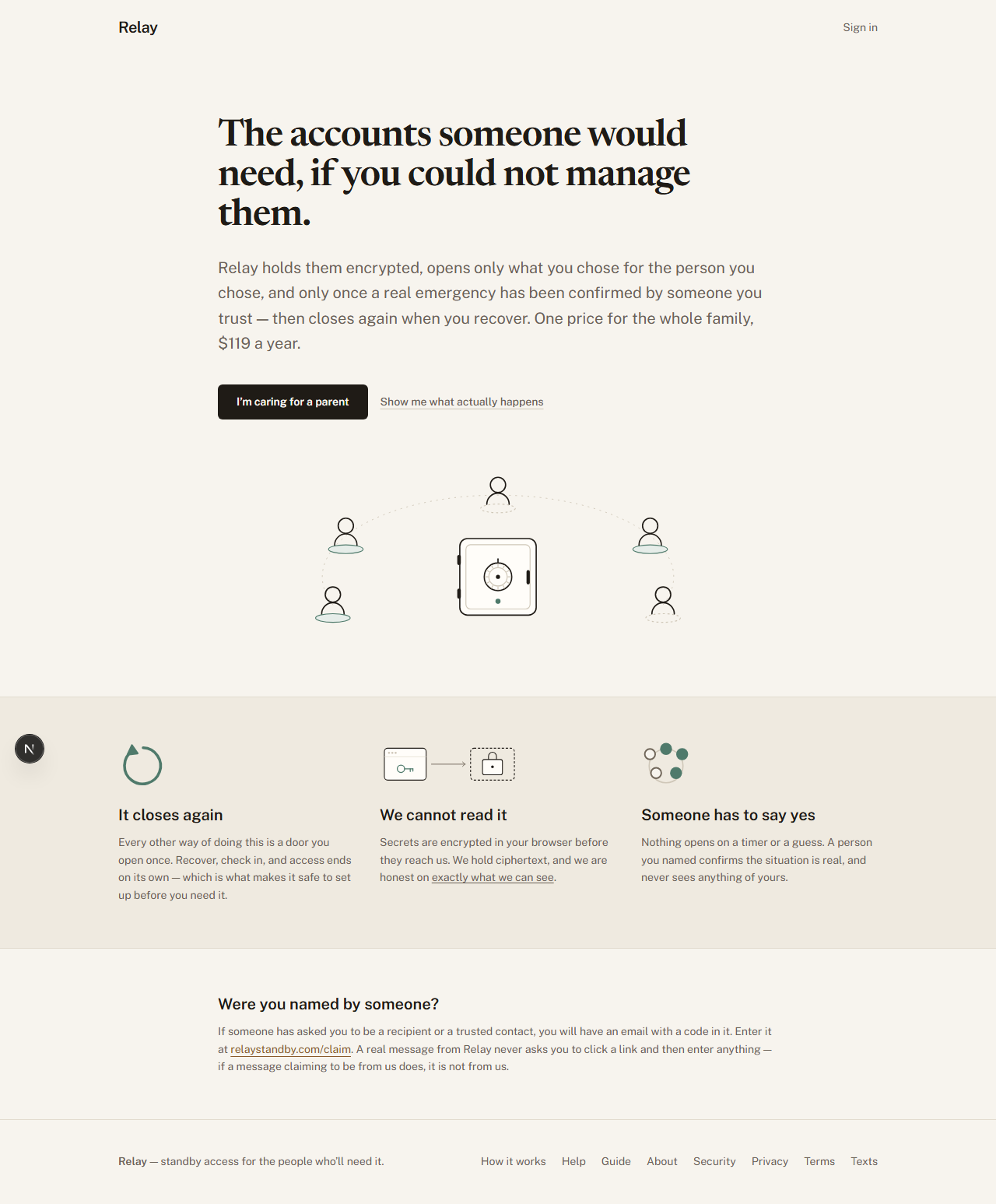
relaystandby.com — the circle standing by around a closed vault, which is the whole product in one picture. Nothing is joined to the vault, because at rest nothing is.
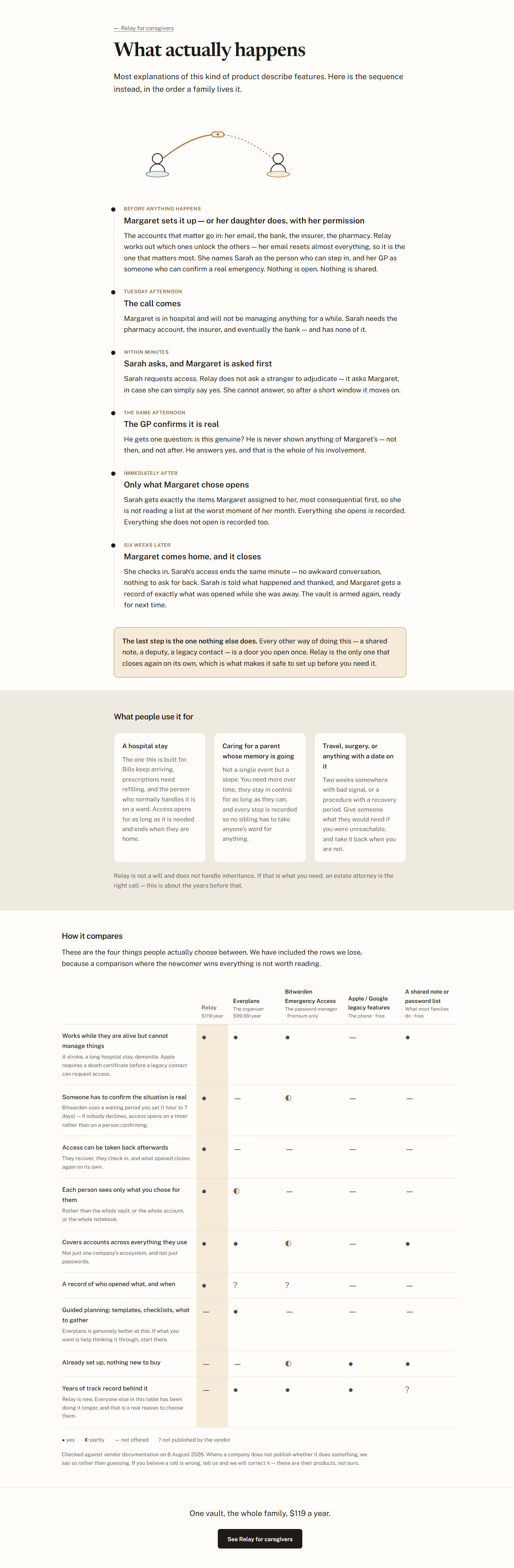
What actually happens is the page to send someone who says they do not understand it. It
tells the story in the order a family lives it, from the day nothing is wrong through to the day
somebody checks back in and it all closes again — and it is the only page that shows the
handoff the product is named after. The line behind what is being passed is solid; the line ahead of
it is dotted, because it has not arrived and can still be called back.
relaystandby.com/how-it-works
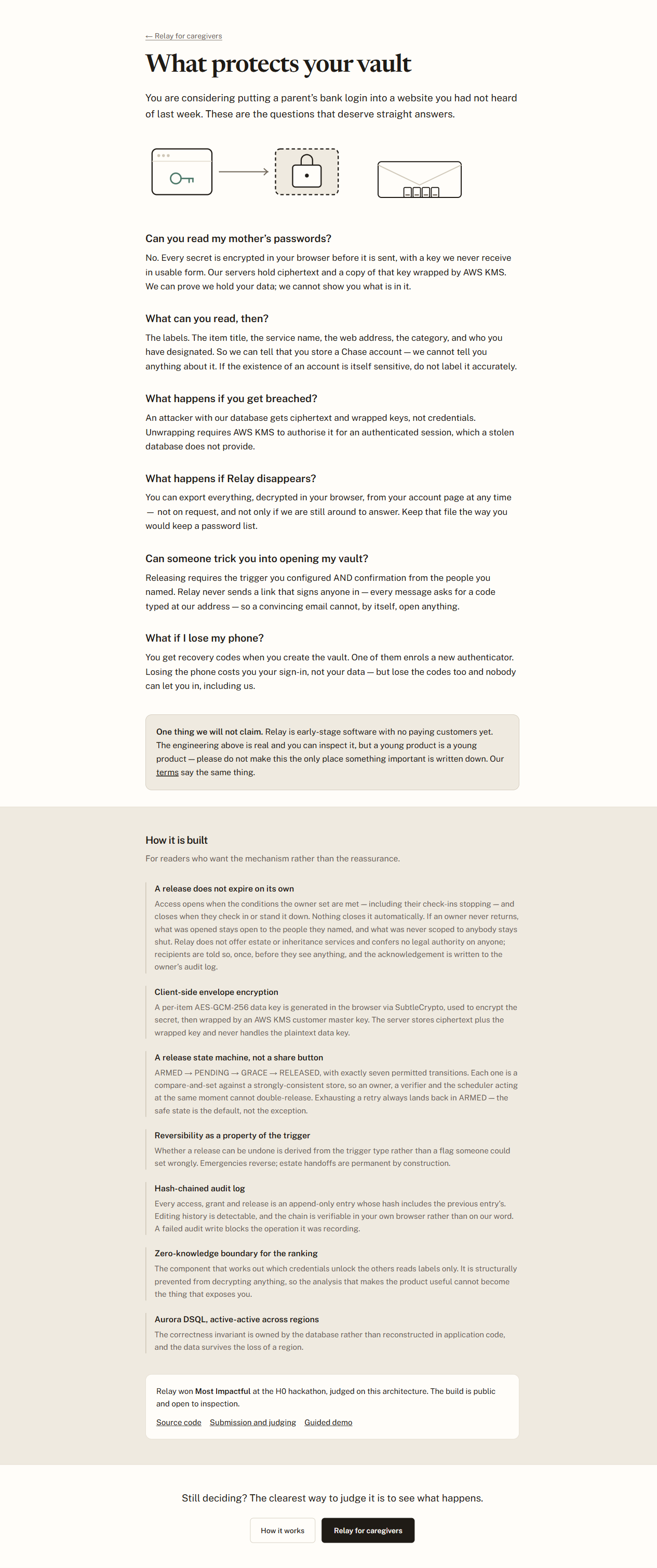
What protects your vault answers the question everybody actually has, which is not about
cryptography: can these people read my mother’s passwords? The two drawings at the top say the
answer before the words do. In the first, the key is on your device and the space where a second one
would sit on our side is empty — that emptiness is the whole security claim. In the second, an
envelope carries four characters you type in yourself, and no link and no key travel with it, which
is why a message from Relay never asks you to click anything.